Tuesday, 26 July 2016

The Brain that Changes Itself, by Norman Doidge

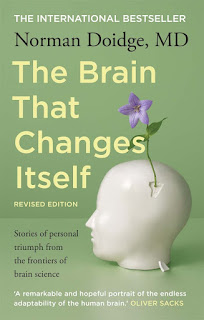
Book cover The Brain that Changes Itself is a remarkable book for several reasons. M.D. Norman Doidge presents several cases of extraordinary events that constitute proof for the book's thesis: that the brain is plastic, easy to remold, to adapt to the data you feed it. What is astonishing is that, while these cases are not new and are by far not the only ones out there, the medical community is clinging to the old belief that the brain is made of clearly localized parts that have specific roles. Doidge is trying to change that.

The ramifications of brain plasticity are wide spread: the way we learn or unlearn things, how we fall in love, how we adapt to new things and we keep our minds active and young, the way we would educate our children, the minimal requirement for a computer brain interface and so much more. The book is structured in 11 chapters and some addendums that seem to be extra material that the author didn't know how to properly format. A huge part is acknowledgements and references, so the book is not that large.

These are the chapters, in order:
  • Chapter 1 - A Woman Perpetually Falling. Describes a woman that lost her sense of balance. She feels she is falling at all times and barely manages to walk using her sight. Put her in front of a weird patterned rug and she falls down. When sensors fed information to an electrode plate on her tongue she was able to have balance again. The wonder comes from the fact that a time after removing the device she would retain her sense. The hypothesis is that the receptors in her inner ear were not destroyed, by damaged, leaving some in working order and some sending incorrect information to the brain. Once a method to separate good and bad receptors, the brain immediately adapted itself to use only the good ones. The doctor that spearheaded her recovery learned the hard way that the brain is plastic, when his father was almost paralyzed by a stroke. He pushed his father to crawl on the ground and try to move the hand that wouldn't move, the leg that wouldn't hold him, the tongue that wouldn't speak. In the end, his father recovered. Later, after he died from another stroke while hiking on a mountain, the doctor had a chance to see the extent of damage done by the first stroke: 97% of the nerves that run from the cerebral cortex to the spine were destroyed.
  • Chapter 2 - Building Herself a Better Brain. Barbara was born in the '50s with an brain "asymmetry". While leaving a relatively normal life she had some mental disabilities that branded her as "retarded". It took two decades to stumble upon studies that showed that the brain was plastic and could adapt. She trained her weakest traits, the ones that doctors were sure to remain inadequate because the part in the brain "associated" with it was missing and found out that her mind adapted to compensate. She and her husband opened a school for children with disabilities, but her astonishing results come from when she was over 20 years old, after years of doctors telling her there was nothing to be done.
  • Chapter 3 - Redesigning the Brain. Michael Merzenich designs a program to train the brain against cognitive impairments or brain injuries. Just tens of hours help improve - and teach people how to keep improving on their own - from things like strokes, learning disabilities, even conditions like autism and schizophrenia. His work is based on scientific experiments that, when presented to the wider community, were ridiculed and actively attacked for the only reason that they went against the accepted dogma.
  • Chapter 4 - Acquiring Tastes and Loves. Very interesting article about how our experiences shape our sense of normalcy, the things we like or dislike, the people we fall for and the things we like to do with them. The chapter also talks about Freud, in a light that truly explains how ahead of his time he was, about pornography and its effects on the brain, about how our pleasure system affects both learning and unlearning and has a very interesting theory about oxytocin, seeing it not as a "commitment neuromodulator", but as a "demodulator", a way to replastify the part of the brain responsible for attachments, allowing us to let go of them and create new ones. It all culminates with the story of Bob Flanagan, a "supermasochist" who did horrible things to his body on stage because he had associated pain with pleasure.
  • Chapter 5 - Midnight Resurrection. A surgeon has a stroke that affects half of his body. Through brain training and physiotherapy, he manages to recover - and not gain magical powers. The rest of the chapter talks about experiments on monkeys that show how the feedback from sensors rewires the brain and how what is not used gets weaker and what is used gets stronger, finer and bigger in the brain.
  • Chapter 6 - Brain Lock Unlocked. This chapter discusses obsessions and bad habits and defective associations in the brain and how they can be broken.
  • Chapter 7 - Pain: The Dark Side of Plasticity. A plastic brain is also the reason why we strongly remember painful moments. A specific case is phantom limbs, where people continue to feel sensations - often the most traumatic ones - after limbs have been removed. The chapter discusses causes and solutions.
  • Chapter 8 - Imagination: How Thinking Makes It So. The brain maps for skills that we imagine we perform change almost as much as when we are actually doing them. This applies to mental activities, but also physical ones. Visualising doing sports prepared people for the moment when they actually did it. The chapter also discusses how easily the brain adapts to using external tools. Brain activity recorders were wired to various tools and monkeys quickly learned to use them without the need for direct electric feedback.
  • Chapter 9 - Turning Our Ghosts into Ancestors. Discussing the actual brain mechanisms behind psychotherapy, in the light of what the book teaches about brain plasticity, makes it more efficient as well as easier to use and understand. The case of Mr. L., Freud's patient, who couldn't keep a stable relationship as he was always looking for another and couldn't remember his childhood and adolescence, sheds light on how brain associates trauma with day to day life and how simply separating the two brain maps fixes problems.
  • Chapter 10 - Rejuvenation. A chapter talking about the neural stem cells and how they can be activated. Yes, they exist and they can be employed without surgical procedures.
  • Chapter 11 - More than the Sum of Her Parts. A girl born without her left hemisphere learns that her disabilities are just untrained parts of her brain. After decades of doctors telling her there is nothing to be done because the parts of her brain that were needed for this and that were not present, she learns that her brain can actually adapt and improve, with the right training. An even more extreme case than what we saw in Chapter 2.

There is much more in the book. I am afraid I am not making it justice with the meager descriptions there. It is not a self-help book and it is not popularising science, it is discussing actual cases, the experiments done to back what was done and emits theories about the amazing plasticity of the brain. Some things I took from it are that we can train our brain to do almost anything, but the training has to follow some rules. Also that we do not use gets discarded in time, while what is used gets reinforced albeit with diminishing efficiency. That is a great argument to do new things and train at things that we are bad at, rather than cement a single scenario brain. The book made me hungry for new senses, which in light of what I have read, are trivial to hook up to one's consciousness.

If you are not into reading, there is an one hour video on YouTube that covers about the same subjects:


Enjoy!

Monday, 25 July 2016

Learning ASP.Net MVC - Part 1 - Setup

Following my post about things I need to learn, I've decided to start a series about writing an ASP.Net MVC Core application, covering as much ground as possible. As a result, this experience will cover .NET Core subjects and a thorough exploration of ASP.Net MVC, plus some concepts related to Visual Studio, project structure, Entity Framework, HTML5, ECMAScript 6, Angular 2, ReactJs, CSS (LESS/SASS), responsive design, OAuth, OData, shadow DOM, etc.

Learning ASP.Net MVC series:
  1. Setup
  2. MVC Concepts
  3. Authentication
  4. Entity Framework Fundamentals
  5. Upgrading project to .NET Core 1.1
  6. Dependency Injection and Services

Specifications


In order to start any project, some specifications need to be addressed. What will the app do and how will it be implemented? I've decided on a simplified rewrite of my WPF newsletter maker project. It gathers subjects from Google, by searching for configurable queries, it spiders the contents, it displays them, filters them, sorts them, extracting text and analyzing content. It remembers the already loaded URLs and allows for marking them as deleted and setting a category. It will be possible to extract the items that have a category into a newsletter containing links, titles, short descriptions and maybe a picture.

The project will be using ASP.Net Core MVC, combining the API and the display in a single web site (at least for now). Data will be stored in SQLite via Entity Framework. Later on the project will be switched to SQL Server to see how easy that is. The web site itself will have HTML5 structure, using the latest semantic elements, with the simplest possible CSS. All project owned Javascript will be ECMAScript6. OAuth might be needed for using the Google Search API, and I intend to use Google/Facebook/Twitter accounts to log in the application, with a specific account marked in the configuration as Administrator. The IDE will be Visual Studio (not Code). The Javascript needs to be clean, with no CSS or HTML in it, by using CSS classes and HTML templates. The HTML needs to be clean, with no Javascript or styling in it; moreover it needs to be semantically unambiguous, so as to be easily molded with CSS. While starting with a desktop only design, a later phase of the project will revamp the CSS, try to make the interface beautiful and work for all screen formats.

Not the simplest of projects, so let's get started.

Creating the project


I will be using Visual Studio 2015 Update 3 with the .Net Core Preview2 tooling. Personally I had a problem installing the Core tools for Visual Studio, but this link solved it for me with a command line switch (short version: DotNetCore.1.0.0-VS2015Tools.Preview2.exe SKIP_VSU_CHECK=1). First step is to create a New Project → Visual C# → .NET Core → ASP.NET Core Web Application. I will name it ContentAggregator. To the prompt asking which type of project template I want to choose, I will select Web Application, deselect Microsoft Azure Host in Cloud checkbox which for whatever reason is checked by default and click on Change Authentication to select Individual User Accounts.


Close the "Welcome to ASP.Net Core" page, because the template will be heavily changed by the time we finish this chapter.

The default template project


For a more detailed analysis of a .NET Core web project, try reading my previous post of the dotnet default template for web apps. This one will be quick and dirty.

Things to notice:
  • There is a global.json file that lists two projects, src and test. So this is how .NET Core solutions were supposed to work. Since the json format will be abandoned by Microsoft, there is no point of exploring this too much. Interesting, though, while there is a "src" folder, there is no "test".
  • The root folder contains a ContentAggregator.sln file and the src folder contains a ContentAggregator folder with a ContentAggregator.xproj file. Core seems to have abandoned the programming language dependent extension for project files.
  • The rest of the project seems to be pretty much the default dotnet tool one, with the following differences:
  • the template uses SQL Server by default
  • the lib folder in wwwroot is already populated with libraries

So far so good. There is also the little issue of the database. As you may remember from the post about the dotnet tool template, there were some files that needed to initialize the database. The error message then said "In Visual Studio, you can use the Package Manager Console to apply pending migrations to the database: PM> Update-Database". Is that what I have to do? Also, we need to check what the database settings are. While I do have an SQL Server instance on this computer, I haven't configured anything yet. The Project_Readme.html page is not very useful, as the link Run tools such as EF migrations and more goes to an obsolete link on github.io (the documentation seems to have moved to a microsoft.com server now).

I *could* read/watch a tutorial, but what the hell? Let's run the website, see what it does! Amazingly, the web site starts, using IIS Express, so I go to Register, to see how the database works and I get the same error about the migrations. I click on the Apply Migrations button and it says the migrations have been applied and that I need to refresh. I do that and voila, it works!

So, where is the database? It is not in the bin folder as WebApplication.db like in the Sqlite version. It's not in the SQL Server, the service wasn't even running. The DefaultConnection string looks like "Server=(localdb)\\mssqllocaldb;Database=aspnet-ContentAggregator-7fafe484-d38b-4230-b8ed-cf4a5a8df5e1;Trusted_Connection=True;MultipleActiveResultSets=true". What's going on? The answer lies in the SQL Server Express LocalDB instance that Visual Studio comes with.

Changing and removing shit


To paraphrase Antoine de Saint-Exupéry, this project will be set up not when I have nothing else to add, but when I have nothing else to remove.

First order of business it to remove SQL Server and use SQLite instead. Quite the opposite of how I have pictured it, but hey, you do what you must! In theory all I have to do it replace .UseSqlServer with .UseSqlite and then adjust the DefaultConnection string from appsettings.json with something like "Data Source=WebApplication.db". Done that, fixed the namespaces and imported projects, ran the solution. Migration error, Apply Migrations, re-register and everything is working. WebApplication.db and everything.

Second is to remove all crap that I don't need right now. I may need it later, so at this point I am backing up my project. I want to remove:
  • Database - yeah, I know I just recreated it, but I need to know what those migrations contained and if I even need them, considering I want to register with OAuth only
  • Controllers - probably I will end up recreating them, but we need to understand why things are how they are
  • Models - we'll do those from scratch, too
  • Services - they were specific to the default web site, so poof! they're gone.
  • Views - the views will be redesigned completely, so we delete them also
  • Client libraries - we keep jQuery and jQuery validation, but we remove bootstrap
  • CSS - we keep the site.css file, but remove everything in it
  • Javascript - keep site.js, but empty
  • Other assets like images - removed

"What the hell, I read so much of this blog post just for you to remove everything you did until now?" Yes! This part is the project set up and before its end we will have a clean white slate on which to create our masterpiece.

So, action! Close Visual Studio. Delete bin (with the db file in it) and obj, delete all files in Controllers, Data, Models, Services, Views. Empty files site.css and site.js, while deleting the .min versions, delete all images, Project_Readme.html and project.lock.json. In order to cleanly remove bootstrap we need to use bower. Run
bower uninstall bootstrap
which will remove bootstrap, but won't remove it from bower.json, so remove it from there. Reopen Visual Studio and the project, wait until it restores the packages.

When trying to compile the project, there are some errors, obviously. First, namespaces that don't exist anymore, like Controllers, Models, Data, Services. Remove the offending usings. Then there are services that we wanted to inject, like SMS and Email, which for now we don't need. Remove the lines that try to use them under // Add application services. The rest of the errors are about ApplicationDbContext and ApplicationUser. Comment them out. These are needed for when we figure out how the project is going to preserve data. Later on a line in Startup.cs will throw an exception ( app.UseIdentity(); ) so comment it out as well.

Finishing touches


Now the project compiles, but it does nothing. Let's finish up by adding a default Controller and a View.

In Visual Studio right click on the Controllers folder in the Solution Explorer and choose Add → Controller → MVC Controller - Empty. Let's continue to name it HomeController. Go to the Views folder, create a new folder called Home. Now you might think that right clicking on it and selecting Add → View would work, but it doesn't. The Add button stubbornly remains disabled unless you specify a template and a model and other stuff. It may be useful later on, but at this stage ignore it. The way to add a view now is go to Add → New Item → MVC View Page. Create an Index.cshtml view and empty its contents.

Now run the application. It should show a wonderfully empty page with no console errors. That's it for our blank project setup. Check out the source code for this point of the exploration. Stay tuned for the real fun!

Huge increases of Javascript code performance when using 'strict' (in a very specific case)

I've run into a very interesting discussion on StackOverflow regarding the significant decrease in execution time when using 'use strict' in Javascript.

Basically, there was a simple function added to the prototype of string to count the occurrences of a specific character in the string. Adding
'use strict';
to the function would make it run ten times faster. The answer boiled down to the fact that for normal Javascript the keyword this forces the type to 'object': typeof(this)==='object', while in strict mode it's whatever the object is (in this case string). In other words, to emulate the same behavior without using strict mode we need to "cast" this to the type we need, using a variable
var str=this+'';

It was a cool thing to learn, with the added bonus that I found out about using console.time to measure Javascript performance as well.

Update: oh, by the way, the performance decreased 4 times! by using .charAt instead of the indexer in order to get the character at a certain position.

Thursday, 21 July 2016

The things I want and maybe need to learn

Some starting topics In September last year I was leaving my job and starting a sabbatical year, with many plans for what seemed then like a lot of time in which to do everything. I was severely underestimating my ability to waste time. Now the year is almost over and I need to start thinking about the technologies in my field of choice that I need to catch up with; and, boy, there is a lot of them! I leave the IT industry alone for one year and kaboom! it blows up like an angry volcano. To be honest, not all of these things that are new for me are just one year old, some I was just ignoring as I didn't need them for my various jobs. Learn from this, as especially in the software business it gets harder and harder to keep up to date and easier and easier to live in a bubble of your own or your employer's creation.

This post is about a list of programming topics that I would like to learn or at least learn to recognize. It's work in progress and probably I will update it for a time. While on my break I created a folder of software development stuff that I would "leave for later". As you can imagine, it got quite large. Today I am opening it for the first time. Be afraid. Be very afraid. I also have a lot of people, either friends or just casual blog or Twitter followings, that constantly let me know of what they are working on. As such, the list will not be very structured, but will be large. Let's begin.

A simple list would look like this. Let me set the list style to ordered list so you can count them:
  1. Typescript 2
  2. ReactJS
  3. JSX
  4. SignalR
  5. Javascript ES6
  6. Xamarin
  7. PhoneGap
  8. Ionic
  9. NodeJS
  10. .NET Core
  11. ASP.Net MVC
  12. R
  13. Python
  14. Unity
  15. Tensorflow
  16. DMTK/CNTK
  17. Visual Studio Code
  18. Jetbrains Project Rider
  19. npm
  20. Bower
  21. Docker
  22. Webpack
  23. Kubernetes
  24. Deep Learning
  25. Statistics
  26. Data mining
  27. Cloud computing
  28. LESS
  29. SASS
  30. CSSX
  31. Responsive design
  32. Multiplatform mobile apps
  33. Blockchains
  34. Parallel programming
  35. Entity Framework
  36. HTML5
  37. AngularJS 2
  38. Cryptography
  39. OpenCV
  40. ZeroNet
  41. Riffle
  42. Bots
  43. Slack
  44. OAuth
  45. OData
  46. DNS
  47. Bittorrent
  48. Roslyn
  49. Universal Windows Platform / Windows 10 development
  50. Katana
  51. Shadow DOM
  52. Serverless architecture
  53. D3 and D4 (d3-like in ReactJs)
  54. KnockoutJs
  55. Caliburn Micro
  56. Fluent Validation
  57. Electron

Yup, there are more than 50 general concepts, major frameworks, programming languages, tools and what not, some of them already researched but maybe not completely. That is not including various miscellaneous small frameworks, pieces of code, projects I want to study or things I want to do. I also need to prioritize them so that I can have at least the semblance of a study plan. Being July 21st, I have about one full month in which to cover the basic minimum. Clearly almost two subjects a day every day is too ambitious a task. Note to self: ignore that little shrieky voice in your head that says it's not!

Being a .NET developer by trade I imagine my next job will be in that area. Also, while I hate this state of affairs, notice there is nothing related to WPF up there. The blogs about the technology that I was reading a few years ago have all dried up, with many of those folks moving to the bloody web. So, I have to start with:

  1. ASP.Net MVC Core - the Model View Controller way of making .NET web applications, I've worked with it, but I am not an expert, as I need to become. Some quickly googled material:
  2. .NET Core - the new version of .NET, redesigned to be cross platform. There is no point of learning .NET Core as standalone: it will be used all over this plan
  3. Entity Framework Core - honestly, I've moved away from ORMs, but clearly Microsoft is moving full steam ahead on using EF everywhere, so I need to learn it well. As resources, everything written or recommended by Julie Lerman should be good, but a quick google later:
  4. OData - an OASIS standard that defines a set of best practices for building and consuming RESTful APIs. When Microsoft adopts an open standard, you pretty much know it will enter the common use vocabulary as a word used more often than "mother". Some resources:
  5. OAuth - An open protocol to allow secure authorization in a simple and standard method from web, mobile and desktop applications. It is increasingly used as "the" authentication method, mostly because it allows for third party integration with Facebook, Twitter, Google and other online identity providers. Some resources:
  6. Typescript 2 - a strict superset of JavaScript from Microsoft, it adds optional static typing and class-based object-oriented programming to the language. Javascript is great, but you can use it in any way you want. There is no way to take advantage of so many cool features of modern IDEs like Visual Studio + ReSharper without some sort of structure. I hope Typescript provides that for me. Resources:
  7. NodeJS - just when I started liking Javascript as a programming language, here comes NodeJs and brings is everywhere! And that made me like it less. Does that make sense? Anyway, with Microsoft tools needing NodeJs for various reasons, I need to look into it. Resources:
  8. Javascript ES6 - the explosion of Javascript put a lot of pressure on the language itself. ECMAScript6 is the newest iteration, adding support for a lot of features that we take for granted in more advanced languages, like classes, block variable scope, lambdas, multiline literals, better regular expressions, modules, etc. I intend to rewrite my browser extension in ES6 Javascript for version 3, among other things. Here are some resources:
  9. npm - npm is a package installer for Javascript. Everybody likes to use it so much that I believe it will soon become an antipattern. Functions like extracting the left side of a string, for example, are considered "packages".
  10. Bower - Bower is a package manager for the web, an attempt to maintain control over a complex ecosystem of web frameworks and libraries and various assets.
  11. Docker - The world’s leading software containerization platform - I don't even know what that means right now - Docker is a tool that I hear more and more about. In August I will even attend an ASP.Net Core + Docker presentation by a Microsoft guy.
  12. Parallel programming - I have built programs that take advantage of parallel programming, but never in a systematic way. I usually write stuff as a single thread, switching to multithreaded work to solve particular problems or to optimize run time. I believe that I need to write everything with parallelism in mind, so I need to train myself in that regard.
  13. Universal Windows Platform - frankly, I don't even know what it means. I am guessing something that brings application development closer to the mobile device/store system, which so far I don't enjoy much, but hey, I need to find out at least what the hell this is all about. The purpose of this software platform is to help develop Metro-style apps that run on both Windows 10 and Windows 10 Mobile without the need to be re-written for each. Resources:
  14. HTML5 - HTML5 is more than a simple rebuttal of the XHTML concept and the adding of a few extra tags and attributes. It is a new way of looking at web pages. While I've used HTML5 features already, I feel like I need to understand the entire concept as a whole.
  15. Responsive design - the bane of my existence was web development. Now I have to do it so it works on any shape, size or DPI screen. It has gone beyond baneful; yet every recruiter seems to have learned the expression "responsive design" by heart and my answer to that needs to be more evolved than a simple "fuck you, too!"
  16. LESS and SASS - CSS is all nice and functional, but it, just like HTML and Javascript, lacks structure. I hope that these compilable-to-CSS frameworks will help me understand a complex stylesheet like I do a complex piece of code.
  17. AngularJS 2 - I hear that Angular 2 is confusing users of Angular 1! which is funny, because I used Angular just for a few weeks without caring too much about it. I've read a book, but I forgot everything about it. Probably it is for the best as I will be learning the framework starting directly with version 2.

So there you have it: less than 20 items, almost two days each. Still bloody tight, but I don't really need to explore things in depth, just to know what they are and how to use them. The in-depth learning needs to come after that, with weeks if not months dedicated to each.

What about the rest of 35 items? Well, the list is still important as a reference. I intend to go through each, however some of the concepts there are there just because I am interested in them, like DNS, Riffle, Bitcoin and Bittorrent, not because they would be useful at my job or even my current side projects. Data mining and artificial intelligence is a fucking tsunami, but I can't become an expert in something like this without first becoming a beginner, and that takes time - in which the bubble might burst, heh heh. Mobile devices are all nice and cool, but the current trend is for tablets to remain a whim, while people divide their experience between laptops and big screen smartphones. The web takes over everything and I dread that the future is less about native apps and more about web sites. What are native mobile apps for? Speed and access to stuff a browser doesn't usually have access to. Two years and a new API later and a web page does that better. APIs move faster nowadays and if they don't, there are browser extensions that can inject anything and work with a locally installed app that provides just the basic functionality.

What do you think of my list? What needs to be added? What needs to be removed? Often learning goes far smoother when you have partners. Anyone interested in going through some subjects and then discuss it over a laptop and a beer?

Wish me luck!

Monday, 18 July 2016

Required versus BindRequired attributes in ASP.Net MVC (Core)

A friend of mine has been employed to write code in the new Microsoft cross-platform ASP.Net Mvc Core and one day he asked be about the difference between the [Required] and the [BindRequired] attributes. Not being an expert in ASP.Net MVC and even less in the Core version, I had no idea so I went exploring.

Fast and dirty

I created a small project and ran it several times to see what the attributes were doing. RequiredAttribute seemed to work quite straightforward: decorate a property of an object with it and, when used as a parameter in an MVC API controller method, that property needs to be set. If it is not, the Controller ModelState.IsValid value will be set to false. Something like this:
public IActionResult Test([FromBody]TestModel model)
TestModel is a simple POCO with Required and BindRequired attributes set on its properties:
public class TestModel
{
[Required]
public string A { get; set; }
[BindRequired]
public string B { get; set; }
}
Now, if I send an object like this
{ A:'Something',B:'Something else' }
I get a true ModelState.IsValid value. If I send only property A, I also get a valid model. If I send only B or an empty object, IsValid will be false. So [Required] works as expected, [BindRequired] doesn't seem to do anything.

Searching through the methods of the controller I noticed one in particular called TryUpdateModelAsync. It tries to populate a model, given as a parameter, with values from the URL or form parameters for the action method. That means if you call the API with something like /api/test/test&A=Something&B=SomethingElse then run
var valid = TryUpdateModelAsync(model).Result;
, valid will be true. However, if you fail to specify a B parameter, valid will be false. Note that the properties of the model change either way. Property A will be filled with whatever you send it, only the result of the attempt will be false.

My friend was not completely satisfied with what I discovered, but it was what I could do in a few minutes of work.

More work

Frankly, I wasn't satisfied either. The only mention I could find of this BindRequired attribute was in the ASP.Net Core documentation, thrown in a list together with [FromBody], which applied to parameters, not object properties, and in unit tests code. So I started digging.

I went to the GitHub repository for aspnet/Mvc and downloaded the source. I then looked for a class named BindRequiredAttribute. It is a very simple class that inherits from BindingBehaviorAttribute and sends BindingBehavior.Required as the base constructor parameter. Its description is "Indicates that a property is required for model binding. When applied to a property, the model binding system requires a value for that property. When applied to a type, the model binding system requires values for all properties of that type." This doesn't say much. So I started to go through the chain of extension methods, interfaces, dependency injection. It wasn't pretty. Let's just say that after a few pages of blog post where I described wandering through classes and properties and trying everything - you wouldn't have understood anything because I didn't - I've decided to delete everything and search the web for more information.

In the end, experimenting with the project is what made it clear(er) for me. In the example I created, the Test method received an object [FromBody], but if I removed that attribute, the content of the call to the API was ignored. Instead, the values from the URL or form POST would be used to fill the object - this explains why FromBody and BindRequired were grouped in the same list. So for the same code without [FromBody]:
public IActionResult Test(TestModel model)
and now the request /api/test/test&A=Something&B=SomethingElse fills the object without the need for content (and ignoring it if it exists). If I remove either A or B, ModelState.IsValid becomes false.

What does it mean?


To me it feels as the [Required] attribute is all that I need since it works in both cases: form values and content, however besides [BindRequired], there is also [BindNever], which removes that property from binding. Imagine you would have a property like "IsAdmin" and you would set it to true programatically - you don't want it to be bound from the URL of the call. I was expecting that attempting to set a property decorated with BindNever would invalidate the model state, but it doesn't work like that, it just ignores the parameter. The System.ComponentModel.DataAnnotations namespace doesn't have an equivalent to BindNeverAttribute.

There is also the issue of the many many many points where the behavior of MVC can be changed and customized. There are a lot of out of the box classes that come with ASP.Net MVC; it only makes sense to use Attribute classes from the same package.

What about the inconsistency? Why does a [BindRequired] attribute not matter when populating a model from the body of the request? Frankly, I don't know. I believe it is because in that case the entire model class has been "bound", its individual properties being "populated" instead.

Hope that helps out a little.

Tuesday, 12 July 2016

We need to understand what democracy is and why politics will fail

Democracy, like any other system of government or political system, is designed to keep the powerful in the driver's seat. It's not about the good of the people, unless they hold power. It was invented and implemented at times when having a large group of people supporting you meant something, gave you the ability to do things. Any other system: theocracy, tyranny, feudalism, communism, fascism... they all do the same thing and fail when the group they support fails to maintain power. Democracy is not about the little people, it's about how fast a system can adapt to changes in the structures of power. It is just the "agile" version of the same old thing. By declaring its ruling group "the people", democracy can survive any political change. The system outlives groups and groups of "people".

Consider the present, where we are split more than ever into voters and the indifferent. Does democracy help the young disillusioned people who more and more refuse to vote for anything? No. That's not a bug in the democratic system, but nor is it a fault or a consequence of not voting; instead it is a realization of a truth, that young people are a minority that is segregated from the old by technology, new ways of communication and networking and ultimately, completely different goals. In this image, the young are the indifferent, but there is a reason for that: they are not the powerful - democracy doesn't work for them either way.

Imagine you are part of a group of three people, each with equal voting rights. Every time you try to influence a decision, the other two vote differently. Will you continue to play the voting game or will you recognize it for what it is: a waste of time? Now imagine you are the king of the three people. How long will you maintain your position when the other two outpower you? Democracy helps the stability of the three-body system, but it does nothing for you. Suddenly, one of the three people starts to like you (or dislike the other) and he starts voting with you. Now you are part of the powerful and your decision matters. Conflict is again averted and stability preserved because as soon as the balance of power changed, the ruling party changed accordingly. It would be stupid for the weak single man to try to fight two, so he grumbles and complains, but does nothing.

In this day and age, there are so many different types of power: military, mediatic, technical, administrative, economic, etc. Democracy doesn't help the many anymore, because they lost their power. Having a lot of idiots in your group doesn't do much. Smart people, they start to realize it and also to understand that the game is rigged. Some try desperately to shift the perspective of the dumb amorphous masses, but if you could do that, you would be in power already because you already have it. Mathematical algorithms are being created to diagnose the health of a network, to determine the influential nodes, to determine the best outcome when the simple "wisdom of the crowds" fails miserably. They could work online, locally, maybe, but in real life? Never.

The Internet itself started as the true hope of mankind to evolve and change. A place where people meet on equal footing, have access to information, can connect and discuss and decide together. What happened? Same thing. A few companies and a few people hold the power to sway the vast hordes of connected people. When that doesn't work, legal pressure is applied from "without", from the real world. People clump together by interest and information source; essentially they become one voice, but one blinded, dumb and ignorant, yet convinced of its own truth. It is a sad moment when we realize that the monopoly of Google, Facebook, Microsoft and the like is better than the complete anarchy of a disorganized web. Do you even remember life before Google? When you would use different search engines to find something? When 99.99% of everything was spam or malware?

But all of this just underlines a very ironic fact: democracy is, in itself, redundant, even circular. It legitimizes itself, it graciously grants power to the ones that already have it. It's a game that covers a truth as old as the world itself. Its only purpose is to minimize unrest by permanently governing the weak. The only true enemy of democracy is not communism or terrorism, it's asymmetric warfare: the rapid accumulation of power in small groups. When a single hacker can challenge the status quo, when a "lone wolf terrorist" can cause much more damage than we can cause them, when software allows you complete anonymity to gather, think and plan something the powerful cannot supervise, that's when democracy fails. That's when the powerful become unsure of their power.

And we know what happens when power is fearful: abuse of power. Beware power, because it makes you an enemy of the state. Not because of shadow cabals or government conspiracies, but because of direct logical consequence. And when I say "state" I mean the whole state (of affairs). It means your neighbors, your friends, your city and only at the end, some sort of authority which, ironically, acts as the perfect agent of a democratic government. It is actually not at all different from the original meaning of the term, coined by ancient Greece, where every citizen could vote, but not all people were citizens. How many sci-fi movies show superpowered individuals being chased by government agencies? Why is that? Because governments are evil? No, it's because unchecked power is illegal. You are allowed power, you never generate it yourself unless you rule.

I predict a moment, not far from now, where democracy as we know it completely fails. Not because it is a bad system, but because we become too fast. Power would shift faster than the system could adapt. We already see glimpses of this in the fashionable "Facebook revolutions", where political outcomes thought to be known change over night because of one rapidly spreading trend. The system will desperately try to adapt and it will succeed, but in doing so will become something akin to the stock market. It will be automatic, it will split society into algorithmically equal sides, holding power for inconsequential amounts of time, having no meaning. Radical movements will gain ground, not because they inspire something, but because they are a little brighter than the bland hemispheres of the political system. I believe at this time the entire political system will crash, like markets crash when they get to this point. Corruption will be the only thing keeping politics together so when the system crashes, it all spews forth like black tainted blood. The new revolutionaries will be vindicated by this and gain a flimsy amount of power that will ultimately fail. Then, as with the Internet, maybe the corporate system will gain ground. Or maybe political capital will move just like economic one, being sold and bought transparently. Who knows?

What I am certain of, though, is that politics - as it is now - is doomed to fail. Not because we become smarter, but because we become too unpredictable.