Saturday, 15 December 2018

Skyward (Skyward #1), by Brandon Sanderson

book cover Skyward is Brandon Sanderson at his best... and worse. Yes, his best characters have always been young rebellious loud mouths with a penchant for over the top lines and punny jokes. And yes, this is a young adult novel with a classically clichéd plot. I feel guilty for liking it so much, but hey, it apparently works! Personally I feel it's a shame Sanderson spends a year writing a book and I finish it in two days, but at least he's not George R. R. Martin!

The whole idea revolves around this society of humans, driven underground by an alien force. They live on a planet surrounded by a sphere of debris few can get through and attacked periodically by alien fighter planes and bombers that the humans must repel in order to survive. And here is this heroic little girl who dreams of becoming a pilot fighter despite her father being universally despised for being a coward and leaving the field of battle. Determined to clear her and her father's name, she enrolls in a school for cadet fighters and discovers she has what it takes to protect her friends and save humankind.

Sounds familiar? It should, every story lately seems to be about the same character. Is it an interesting and engaging character? Yes. Is the world weird and familiar enough to be enjoyed? Yes. If this is all you need, you will love the book. And of course, it's the first book in a series. I need a little more, though, and I feel that the twists were terribly predictable and there were holes everywhere in the world building. If you only focus on the characters, as the author did, you enjoy the book. But as soon as you try to imagine yourself there, things start to make little sense and whatever you would do, it would not be what the characters in the book do. Plus... that fighter! Deus Ex Machina much?

Bottom line: lovely book to read in a few days and feel you are a reader, but the story is as standard as they come and the only nice thing about it is that Sanderson wrote it.

Friday, 14 December 2018

Static analysis of code in Visual Studio, Rule sets, etc

Intro


Visual Studio has a very interesting feature called Rule Sets. You basically create a file where you declare which warnings from analyzers will be ignored, displayed as info, warning or error. With the built in code analysis, but also with the help of a plethora of extensions and NuGet packages, this can be a very powerful tool. I am using VS2017 Professional for this post.

Create a rule set


Let's start with creating a new project (a .NET Framework console app) called Rulesets, which will create the standard Program.cs file and a solution for the project. Next, right click the solution in Solution Explorer and go to Add → New Item, go to the General category and select Code Analysis Rule Set. Name it whatever you want to name it, I will call it default.ruleset, then save it.


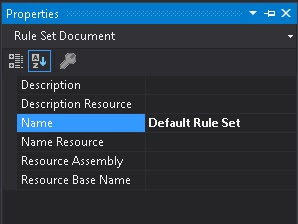
At this point you should be in a rule set editor, showing you a list of rules grouped by code analyzer id. Press F4 or go to the little wrench icon so that the Properties window is open, then give your ruleset a name (Default Rule Set) and save the file (ctrl-S).


You can create as many of these files and they will be saved in the Solution Items or as a file in a project (I recommend the former) and associate them to any number of projects. Let's assign the new rule set to our project: Go to the solution properties, select Common Properties → Code Analysis Settings, then select as many projects as you want in the list in the right. Then click on the little dropdown arrow an you should be prompted with a list of possible rules, including Default Rule Set. Select it.


Obviously, you can just choose a Microsoft included rule set instead, but those do not take into account your own extensions/packages.

Note: in order to start an incremental process, let's say starting with the minimum recommended settings from Microsoft and then adding stuff to it, use the Include element in a .ruleset file. The files coming by default with Visual Studio can be found at %ProgramFiles(x86)%/Microsoft Visual Studio/2017/Professional/Team Tools/Static Analysis Tools/Rule Sets. Example:
<Include Path="minimumrecommendedrules.ruleset" Action="Default" />

From the Visual Studio GUI you can click on the folder icon in the rule set editor top bar to include other sets and the wrench icon to open the settings.

This helps a lot with having small variations between your projects. For example a tests project might have different settings. Or the data access layer project might have auto generated files that don't respect your coding standards. You can just create a new ruleset that includes the default, then disables some of the rules, like mandatory class documentation.

Note that the rule set editor is not perfect. It will only show the rules as defined in the current file, ignoring the included sets. That is why if the default for a rule is None and you set it to Warning in your base set which you then include in another set where you set it back to None, it will not be saved correctly. Some manual checks are required to ensure correctness.

A list of analyzers


Now, I've noticed a list of possible extensions for Visual Studio that use this system. Here is a list of the ones I thought were good enough, free and useful.
Visual Studio extensions:
  • Microsoft Code Analysis 2017 - Live code analysis rules and code fixes addressing API design, performance, security, and best practices for C# and Visual Basic.
  • Security Code Scan - Detects various security vulnerability patterns: SQL Injection, Cross-Site Scripting (XSS), Cross-Site Request Forgery (CSRF), XML eXternal Entity Injection (XXE), etc.
  • MetricsAnalyzer - analyzer extension to check if you code follow metrics rules
  • Moq.Analyzers - Visual Studio extension that helps to write unit tests using Moq mocking library by highlighting typical errors and suggesting quick fixes
  • Code Cracker for C# - analyzer library for C# that uses Roslyn to produce refactorings, code analysis, and other niceties
  • Visual Studio Intellicode - this is interesting in the sense that it uses AI to improve your code and intellisense
  • Roslynator 2017 - A collection of 500+ analyzers, refactorings and fixes for C#, powered by Roslyn.
  • SonarLint for Visual Studio 2017 - Roslyn based static code analysis: Find and instantly fix nasty bugs and code smells in C#, VB.Net, C, C++ and JS.
  • clean-code-net - Set of C# Roslyn analyzers to improve code correctness
  • CommentCop - Analyzes (mostly) xml comments and provides code fixes. Uses Roslyn C# code analyser.

NuGet packages:
  • StyleCop.Analyzers - there is also a StyleCop extension, but weirdly it does not use the Rule Set system and you just run it manually and gives you warnings that you can control only through the extension configuration
  • Public API Analyzer - An analyzer for packages with public APIs.
  • UnityEngineAnalyzer - Roslyn Analyzer for Unity3D
  • AsyncAwaitAnalyzer - A set of Roslyn Diagnostic Analyzers and Code Fixes for Async/Await Programming in C#.
  • ef-perf-analyzer - EntityFramework Performance Analyzer
  • Asyncify-CSharp - an analyzer and codefix that allows you to quickly update your code to use the Task Asynchronous Programming model.

The packages above are NuGets you install in your project. Just check out the list from NuGet: NuGet packages containing Analyzer. Many extensions also have a NuGet counterpart. It's your choice if you want to not bloat your Visual Studio and choose to install analyzers on a per project basis. There is one advantage more in using project packages: the analysis will pop up at build time and you can thus enforce not being able to compile without following the rules in the set.

Curating your rule sets


So you've learned how to choose a rule set for your projects, how to create your own, but what do you use them for? My suggestion is to work on a complete rule set (or sets) for your entire company and then you can just enforce a coding style without having to manually code review everything.

If you are like me, then you probably installed everything in that list above and then tried it on your project... and you got tens of thousands of warnings and errors. How do you curate a rule set without having to go through every single message? I see several ways of doing this.

The perfect project


Some people/companies have a flagship technical project that they are very proud of. It uses all the latest technologies, it is perfectly written, thoroughly code reviewed by all the members of the team. It can do no wrong. If you have such a project, just enable all possible rules, then disable all that make suggestions for change. In the end you will have a rule set enforcing your coding style, for better or worse.

Start from scratch


The other solution is to start with a new project, then review every message until you get none. Then start coding. An iterative process, for sure, one you will never finish, but it will be good enough after a while and it will also engage your team in technical discussions on how to improve their code, which can't possibly hurt.

Add analyzers one by one


Start with a rule set where all rules are disabled, then start reviewing them one by one, as you either chose to disable them or refactor your code. This solution may be the worse, because it gives excuses to just stop the process midway, but it might be the only one available. Anyway, try to install extensions and packages one by one, too.

Start from the coding standards


Perhaps you have a document describing the coding standards in your team. You might start from it, then look for the rules that enforce it. I think that this will only make you see how woefully inadequate your coding standards are, but it might work.

Other notes


I've had the situation where I created derived rulesets from the default one (using Include) and somehow they ended up with an absolute path for the default ruleset file. It might be an issue with how the editor saves the file.

By default, rules in the ruleset editor are grouped by analyzer ID, but multiple analyzers might manage the same rules, so always manage rules individually, else you will see that enabling or disabling an entire group will change other groups as well and you won't know where you started from.

The ruleset editor is not perfect. One very annoying issue is with ruleset inheritance (doesn't load the parent rules). One example is that you want to have a general ruleset that does NOT include an analyzer (let's say the XUnit one) and then you want something inheriting the base ruleset to DO include the XUnit analyzer. While you can do it by hand, the ruleset editor will not allow you to make these changes, as the original ruleset will have every XUnit rule disabled, but the editor for the unit test one will not know this. There are two solutions for this:
  1. Have a very inclusive basic rule set, then remove rules from the others. This is not perfect, as there could be circular needs (one set has one rule and not the other, while the other has them the other way around)
  2. Have a lot of basic rule sets, split on topic. Then manage every rule set that you need as just includes. This works in every situation, but requires you edit the used rulesets by hand. In the case above you could have a special DoNotUseXunitAnalyzers.ruleset, for example.
  3. A third solution that I do not recommend is to never include anything, instead just copy paste the content of the basic ruleset in every inheriting one. While this works and allows the editor and whatever engine behind to work well, it would be a nightmare to maintain.

Conclusion


I've discussed how to define and control static code analysis in your Visual Studio projects. If nothing of what is available is up to your standards, Roslyn now allows making your own code analyzers in a very simple way. Using code analyzers (and refactorings) can improve productivity, engage the team in technical analysis of standards, enforce some coding standards and help you find hard to detect errors in your code.

Hope it helps.

Thursday, 13 December 2018

Constant vs Static Readonly

I was playing with code analysis rule sets in Visual Studio (see my blog post about it) and I got hit by come conflicting rules. I will discuss only SonarSource rules, but a lot of other analyzers have similar rules.

OK, one of them is something that I intuitively thought was universally good: RSPEC-3962: "static readonly" constants should be "const" instead. Makes sense, right? A constant is compiled better, integrated faster, it's a constant! No overhead, nothing changes it. This rule was marked as a minor improvement to the code, anyway.

Then, bam!, RSPEC-2339: Public constant members should not be used. Critical rule! Basically it says the opposite: turn your constant into static readonly. What's going on?!

This is not one of those pairs of rules that contradict each other based on user preference, like using var instead of the type name when the type is obvious and viceversa. These are two different, apparently conflicting, yet complementary concepts.

But what is really the difference between a static readonly field and a constant, other than constants can only be value types? Constant values are retrieved at compile time, as an optimization, since they are not expected to change, while static readonly values are retrieved at runtime. This means that if you use a library in your project, the constants it declares will be incorporated into your application when you compile it. You may change the .dll of the library afterwards, with inconsistent results, since readonly statics will now have changed values and the constants not.

Here, an example. In the creatively named project Library there is a Container class with a public constant ingeniously named Constant and a public static readonly field that has the same value as Constant.
namespace Library
{
public class Container
{
public const int Constant = 1;
public static readonly int StaticReadonly = Constant;
}
}

Then there is a program that uses these two values to display them:
class Program
{
static void Main(string[] args)
{
Console.WriteLine($"Container.Constant: {Container.Constant} Container.StaticReadonly: {Container.StaticReadonly}");
Console.ReadKey();
}
}

The expected output is Container.Constant: 1 Container.StaticReadonly: 1. Now change the value of Constant to 2, right click the Library project and only build it, not the program. Then take the resulting .dll and copy it in the bin folder of the program, then run it manually. The output is now... Container.Constant: 1 Container.StaticReadonly: 2 and that from a code like StaticReadonly = Constant;.

Conclusion: public constants should be avoided if they are used between projects and since you don't know where they will be used, better to avoid them at all times. This will really annoy people who like to create separate classes to store constants, but that's OK, because the feeling is mutual.

FormattableString and string interpolation

So I was watching this Entity Framework presentation and I noticed one example that looked like this:
db.ExecuteSqlCommand($"delete from Log where Time<{time}");

Was this an invitation to SQL injection? Apparently not, since the resulting SQL was something like DELETE FROM Log WHERE Time < @_p0. But how could that be? Enter FormattableString, which is a class implementing the venerable IFormattable interface, but which is available in .NET Framework only from version 4.6 and in .NET Core from the very beginning. Apparently, when an interpolated string is assigned to a FormattableString, it is compiled as an instance with all the values from the string before the formatting. In our case ExecuteSqlCommand had a FormattableString overload. Note that the method is an extension method from RelationalDatabaseFacadeExtensions, not Database.ExecuteSqlCommand.

Let's test this with a little program:
class Program
{
static void Main(string[] args)
{
var timeDisplay = new TimeDisplay();
Test($"Time display:{timeDisplay}");
Console.ReadKey();
}
 
private static void Test(string text)
{
Console.WriteLine(text);
}
 
private class TimeDisplay
{
public override string ToString()
{
return DateTime.Now.ToString("s");
}
}
}

Here I create an instance of TimeDisplay and then use it in an interpolated string which is then sent to the Test method, which Console.WriteLines it. The ToString method of TimeDisplay is overridden to display the current time. The result is predictable: Time display:2018-12-13T11:24:02. I will then change the type of the parameter of Test to be FormattableString. It still works and it displays the same thing. Note that if I have both a FormattableString and a string version of the same method, string will be used first when an interpolated string is sent as a parameter!

But what do I get in that instance? Let's change the Test method even more:
private static void Test(FormattableString text)
{
Console.WriteLine($"Format: {text.Format} " +
$"ArgumentCount: {text.ArgumentCount} " +
$"Arguments: {string.Join(", ",text.GetArguments())}");
}

The displayed result of the program is now Format: Time display:{0} ArgumentCount: 1 Arguments: 2018-12-13T11:28:35. Note that the argument is in fact a TimeDisplay instance and it is displayed as a time stamp because of the ToString override.

What does this mean?

Well, we can do great things like Entity Framework does, interpreting the intent of the developer and providing a more informed output. I am considering this as a solution for logging. Logger.LogDebug($"{someObjectWithAHeavyToString}") now doesn't have to execute the ToString() method of the object unless the Debug log level is enabled, for example.

But we can also really mess things up. I will get past the possible yet unlikely security problem where you believe you pass an object as .ToString() and in fact it is passed as the entire object, allowing a malicious library to do whatever it wants with it. Let's consider more probable scenarios.

One is that a code reviewer will tell you "put magic strings in their own variables or constants", so you immediately take the string sent to test and automatically move it a local variable (which Visual Studio will create it as a FormattableString), then you replace that with var (because the type is obvious, right?). Suddenly the test variable is a string.

Another is even worse, although if you decided to code like this you have other issues. Let's get back to something similar to the original example:
db.ExecuteSqlCommand($"delete from Log where Id = {id}");

And let's change it:
var sql=$"delete from Log where Id = {id}";
db.ExecuteSqlCommand(sql);

Now sql is a string, its value is computed from the id, which might be provided by the user. Replace this with Bobby Tables and you got a nice SQL injection.

Conclusion: an interesting, if somewhat confusing, concept. Other than the logging idea, which I admit is pretty interesting, I am yet to find a good place to use it.

Sunday, 9 December 2018

The Everything Creative Writing Book, by Wendy Burt-Thomas

book cover The name says it all: "The Everything Creative Writing Book: All you need to know to write novels, plays, short stories, screenplays, poems, articles, or blogs", maybe too much. In this book, Wendy Burt-Thomas takes a holistic approach to writing, discussing everything from how to write poetry and children's books, blogs and technical specs to how to find an agent, self publish and so on. It covers writing techniques and editing advice, writer block solutions and how to deal with rejection (or success for that matter) and many more. In that regard, the book is awesome, it shows everything you might want to know a little about in order to decide what you actually choose to do, but like that Nicholas Butler quote An expert is one who knows more and more about less and less until he knows absolutely everything about nothing, the book is probably not very useful to someone who has already started working on things.

That said, the book is compact, to the point and can help a lot at the very beginning of the writer's journey. It can be used as a reference, so that whenever a particular subject or concern appears, you just flip to that chapter and see what Wendy recommends. Is it good advice? I have no idea. I've certainly read books that go more in depth about topics that interested me more, like how to write a novel or how to set up a scene, but a panoramic view of the business is not bad either. The material also felt a little dated for something released in 2010, especially in the technical sections.

You choose if you find it useful or not.

Thursday, 6 December 2018

How to build an Adapter for similar libraries in .NET

Intro


An adapter is a software pattern that exposes functionality through an interface different from the original one. Let's say you have an oven, with the function Bake(int temperature, TimeSpan time) and you expose a MakePizza() interface. It still bakes at a specific temperature for an amount of time, but you use it differently. Sometimes we have similar libraries with a common goal, but different scope, that one is tempted to hide under a common adapter. You might want to just cook things, not bake or fry.

So here is a post about good practices of designing a library project (complete with the use of software patterns, ugh!).


Examples


An example in .NET would be the WebRequest.Create method. It receives an URI as a parameter and, based on its type, returns a different implementation that will handle the resource in the way declared by the WebRequest. For HTTP, it will used an HttpWebRequest, for FTP an FtpWebRequest, for file access a FileWebRequest and so on. They are all implementations of the abstract class WebRequest which would be our adapter. The Create method itself is an example of the factory method pattern.

But there are issues with this. Let's assume that we have different libraries/projects that handle a specific resource scope. They may be so different as to be managed by different organizations. A team works on files, another on HTTP and the FTP one is an open source third party library. Your team works on the WebRequest class and has to consider the implications of having a Create factory method. Is there a switch there? "if URI starts with http or https, return new HttpWebRequest"? In that case, your WebRequest library will need to depend on the library that contains HttpWebRequest! And it's just not possible, since it would be a circular reference. Had your project control over all implementations, it would still be a bad idea to let a base class know about a derived class. If you move the factory into a factory class it still means your adapter library has to depend on every implementation of the common interface. As Joe Armstrong would say You wanted a banana but what you got was a gorilla holding the banana and the entire jungle.

So how did Microsoft solve it? Well, they did move the implementation of the factory in another creator class that would implement IWebRequestCreate. Then they used configuration to associate a prefix with an implementation of WebRequest. Guess you didn't know that, did you? You can register your own implementations via code or configuration! It's such an obscure feature that if you Google WebRequestModulesSection you mostly get links to source code.

Another very successful example of an adapter library is jQuery. Yes, the one they now say you don't need anymore, it took industry only 12 years to catch up after all. Anyway, at the time there were very different implementations of what people thought a web browser should be. The way the DOM was represented, the Javascript objects and methods, the way they actually worked compared to the way they should have worked, everything was different. So developers were often either favoring a browser over others or were forced to write code for each possible version. Something like "if Internet Explorer, do A, if Netscape, do B". The problem with this is that if you tried to use a browser that was neither Internet Explorer or Netscape, it would either break or show you one of those annoying "browser not supported" messages.

Enter jQuery, which abstracted access over all these different interfaces with a common (and very nicely designed) one. Not only did it have a fluent interface that allowed you to do multiple things with a single target (stuff like $('#myElement').show().css({opacity:0.7}).text('My text');), but it was extensible, allowing third parties to add modules that would allow even more functionality ($('#myElement').doSomethingCool();). Sound familiar? Extensibility seems to be an important common feature of well designed adapters.

Speaking of jQuery, one very used feature was jQuery.browser, which told you what browser you were using. It had a very sophisticated and complex code to get around the quirks of every browser out there. Now you had the ability to do something like if ($.browser.msie) say('OMG! You like Microsoft, you must suck!'); Guess what, the browser extension was deprecated in jQuery 1.9 and not because it was not inclusive. Well, that's the actual reason, but from a technical point of view, not political correctness. You see, now you have all this brand new interface that works great on all browsers and yet still your browser can't access a page correctly. It's either an untested version of a particular browser, or a different type of browser, or the conditions for letting the user in were too restrictive.

The solution was to rely on feature detection, not product versions. For example you use another Javascript library called Modernizr and write code like if (Modernizr.localstorage) { /* supported */ } else { /* not-supported */ }. There are so many possible features to detect that Modernizr lets you pick and choose the ones you need and then constructs the library that handles each instead of bundling it all in one huge package. They are themselves extensible. You might ask what all this has to do with libraries in .NET. I am getting there.

The last example: Entity Framework. This is a hugely popular framework for database access from Microsoft. It would abstract the type of the database behind a very nice (also fluent) interface in .NET code. But how does it do that? I mean, what if I need SQL Server? What if I want MongoDB or PostgreSQL?

The way is having different "providers" to translate .NET code Expressions into whatever the storage needs. The individual providers are added as dependencies to your project, without the need for Entity Framework to know about them. Then they are configured for use in code, because they implement some common interfaces, and they are ready for use.

Principles for adapters


So now we have some idea about what is good in an adapter:
  • Ease of use
  • Common interface
  • Extensibility
  • No direct dependency between the interface and what is adapted
  • An interface per feature

Now that I wrote it down, it sounds kind of weird: the interface should not depend on what it adapts. It is correct, though. In the case of Entity Framework, for example, the provider for MySql is an adapter between the use interface of MySql and the .NET interfaces declared by Entity Framework; interfaces are just declarations of what something should do, not implementation.

Picture time!


The factory and the common interface are one library that will use that library in your project. Each individual adapter depends on it, as well, but your project doesn't need to know about it until needed.

Now, it's your choice if you register the adapters dynamically (so, let's say you load the .dll and extract the objects that implement a specific interface and they know themselves to what they apply, like FtpWebRequest for ftp: strings) or you add dependencies to individual adapters to your project and then manually register them yourself and strong typed. The important thing is that you don't reference the factory library and automatically be forced to get all the possible implementations added to your project.

It seems I've covered all points except the last one. That is pretty important, so read on!

Imagine that the things you want to adapt are not really that similar. You want to force them into a common shape, but there will be bits that are specific to one domain only and you might want them. Now here is an example of how NOT to do things:
var target = new TargetFactory().Get(connectionString);
if
(target is SomeSpecificTarget specificTarget) {
specificTarget.Authenticate(username, password);
}
target.DoTargetStuff();
In this case I use the adapter for Target, but then bring in the knowledge of a specific target called SomeSpecificTarget and use a method that I just know is there. This is bad for several reasons:
  1. For someone to understand this code they must know what SomeSpecificTarget does, invalidating the concept of an adapter
  2. I need to know that for that specific connection string a certain type will always be returned, which might not be the case if the factory changes
  3. I need to know how SomeSpecificTarget works internally, which might also change in the future
  4. I must add a dependency to SomeSpecificTarget to my project, which is at least inconsistent as I didn't add dependencies to all possible Target implementations
  5. If different types of Target will be available, I will have to write code for all possibilities
  6. If new types of Target become available, I will have to change the code for each new addition to what is essentially third party code

And now I will show you two different versions that I think are good. The first is simple enough:
var target = new TargetFactory().Get(connectionString);
if
(target is IAuthenticationTarget authTarget) {
authTarget.Authenticate(username, password);
}
target.DoTargetStuff();
No major change other than I am checking if the target implements IAuthenticationTarget (which would best be an interface in the common interface project). Now every target that requires (or will ever require) authentication will receive the credentials without the need to change your code.

The other solution is more complex, but it allows for greater flexibility:
var serviceProvider = new TargetFactory()
.GetServiceProvider(connectionString);
var target = serviceProvider.Get<ITargetProvider>()
.Get();
serviceProvider.Get<ICredentialsManager>()
?.AddCredentials(target, new Credentials(username, password));
target.DoTargetStuff();
So here I am not getting a target, but a service provider (which is another software pattern, BTW), based on the same connection string. This provider will give me implementations of a target provider and a credentials manager. Now I don't even need to have a credentials manager available: if it doesn't exist, this will do nothing. If I do have one, it will decide by itself what it needs to do with the credentials with a target. Does it need to authenticate now or later? You don't care. You just add the credentials and let the provider decide what needs to be done.

This last approach is related to the concept of inversion of control. Your code declares intent while the framework decides what to do. I don't need to know of the existence of specific implementations of Target or indeed of how credentials are being used.

Here is the final version, using extension methods in a method chaining fashion, similar to jQuery and Entity Framework, in order to reinforce that Ease of use principle:
// your code
var target = new TargetFactory()
.Get(connectionString)
.WithCredentials(username,password);
 
 
// in a static extensions class
 
public static Target WithCredentials(this Target target, string username, string password)
{
target.Get<ICredentialsProvider>()
?.AddCredentials(target, new Credentials(username, password));
return target;
}
 
public static T Get<T>(this Target target)
{
return target.GetServiceProvider()
.Get<T>();
}
This assumes that a Target has a method called GetServiceProvider which will return the provider for any interface required so that the whole code is centered on the Target type, not IServiceProvider, but that's just one possible solution.

Conclusion


As long as the principles above are respected, your library should be easy to use and easy to extend without the need to change existing code or consider individual implementations. The projects using it will only use the minimum amount of code required to do the job and themselves be dependent only on interface declarations. As well as those are respected, the code will work without change. It's really meta: if you respect the interface described in this blog then all interfaces will be respected in the code all the way down! Only some developer locked in a cellar somewhere will need to know how things are actually getting done.

Sunday, 2 December 2018

The Mist

No natural phenomenon, except maybe fire, seems more alive than the mist. But while fire is young, angry, destructive, mist is an old grumpy creature, moving slowly, hiding itself in contradictions. It doesn't hide distant features as much as it reveals close ones through contrast, it doesn't absorb light as much as it lets itself glow around sources of illumination, it makes sounds crystal clear by covering the constant hum of far off noise, dense and yet immaterial, its blanket like qualities offset by its cold embrace. Never more life like than when it clings to a still surface of water, the slightest gust of wind prompts annoyed tendrils and every move of another living thing elicits mirror acts, dream like, half finished motions forgotten before they even end. If mist could only remember...