Sunday, 4 November 2018

Analyzing memory leaks in .NET applications running in production

Intro


I had this situation where an application that was running in production was getting bigger and bigger until it would devour all memory. I had to fix the problem, but how could I identify the cause? Running it on my computer wouldn't lead to the same increase in memory, what I wanted to see was why a simple web API would take 6Gb in memory and keep growing.

The process is simple enough:
  1. Get a memory dump from the running process
  2. Analyze the memory dump

While this post relates specifically to process memory dumps, one can get whole memory dumps and analyze those. There are two types of process memory dump formats: mini and full. I will be talking about the full format.

Fortunately, for our process, there are only two steps. Unfortunately, both are fraught with problems. Let's go through each.

Getting a memory dump from a running process


Apparently that is as simple as opening Task Manager, right clicking on the running process in the Details tab and selecting Create dump file. However, what this does is suspend the process and then copy all of its memory in a file in %AppData%/Local/Temp/[name of process].dmp. If the process is being watched or some other issue occur, the dumping will fail. Personally, I couldn't dump anything over 2Gb when I was trying to get the info from w3wp.exe (the IIS process) as the process would restart.

There are a lot of other ways of getting a process memory dump, including crash dumps, periodic dumps, event driven dumps. ProcDump, one of the utilities in the free SysInternals suite, can do all of those. The Windows Error Reporting (WER) system also generates dumps for faulty or unresponsive application or kernel. Other options for collecting a dump are userdum.exep, Windows Debugger (ntsd or windbg). Process Explorer, of course, can create two types of memory dumps for a process: mini and full.

Analyzing a process memory dump


This is where it gets tricky. What you would like is something that opens the file and shows a nice interactive interface explaining exactly what hogs your memory. Visual Studio does that, but only the Ultimate version gives you the memory analysis option. dotMemory from JetBrains is great, but it also costs a lot of money.

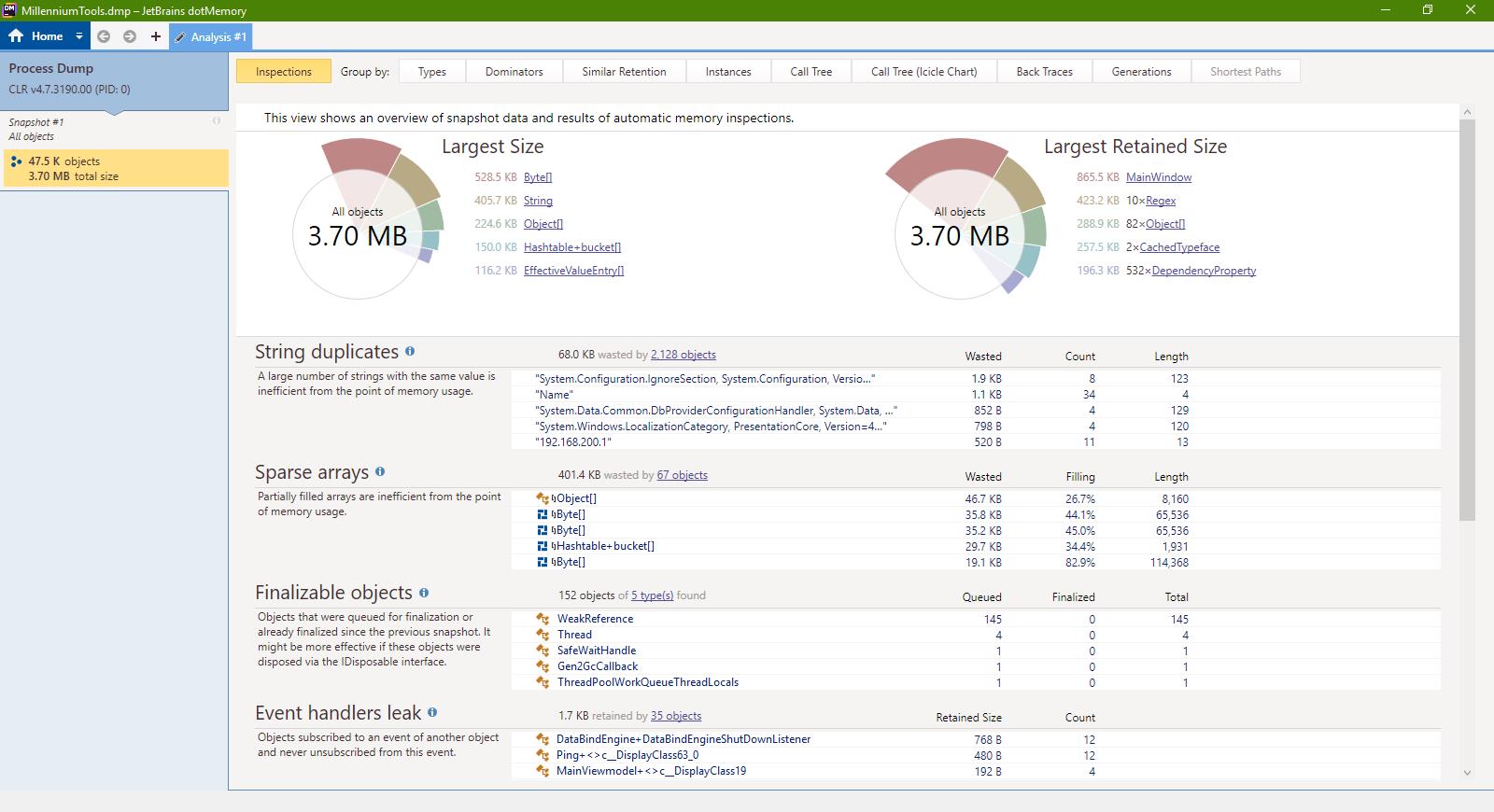
My personal experience was using dotMemory in the five days in which it is free and it was as seamless as I would have wanted: I opened the file, it showed me a pie graph with what objects were hogging my memory, I clicked on them, looked where and how they were stored and even what paths could be taken to create those instances. It was beautiful.

Another option is SciTech's .NET Memory Profiler, but it is also rather expensive. I am sure RedGate has something, too, but their trials are way to intrusive for me to download.

I have been looking for free alternatives and frankly all I could find is WinDBG, which is included in Windows Debugging Tools.

Windows Debugger is the name of the software. It is a very basic tool, but there are visualizers which use it to show information. One of them is MemoScope, which appears unmaintained at the moment and is kind of weird looking, but it works. Unfortunately, it doesn't even come close to what dotMemory was showing me. If analyzing a random .NET app dump showed that the biggest memory usage was coming from MainWindow (makes sense) which then had a lvItems that held most of memory (it was a ListView with a lot of data), WinDbg and therefore MemoScope show the biggest usage comes from arrays of bytes. And it also makes sense, physically, but there is no logical context. A step by step memory profiling guide using WinDbg can be found here.

Conclusion


I am biased towards JetBrains software, which is usually amazing, although I haven't used it a quite a while because their obnoxious licensing system (you basically rent the software). I loved how quickly I got to the problem I had with dotMemory. .NET Memory Profiler from SciTech is way cheaper and seems to point in the right direction, but doesn't really compare in terms of quality. Anything else I've tried was quite subpar.


Doing it yourself


As they say, if you want to do something right, you gotta do it yourself.

There is a Windows API called MiniDumpWriteDump that you can use programatically to create the dumps. However, as you've seen, that's not the problem, the dump analysis is.

And it's hard to find anything that is not very deep and complicated. Memory dumps are usually analysed for forensic reasons. There are specialists who have written scores of books on memory dump analysis. What's worse, most people focus on crash dumps, with memory leak analysis usually done while debugging an application.

I certainly don't have the time to work on a tool to help me with this particular issue. I barely had the time to look for existing tools. But if you, guys, can add information to this blog post, I am sure it will help a lot of people going through the same thing.

Pretty Pictures


I didn't find a nice way of putting the images in the post's text, I am adding them here.


Thursday, 1 November 2018

MemoryCache.Default suddenly not working

MemoryCache has a really strange behavior where all of a sudden, without any warning or exception, it stops caching. You use Set or Add, it doesn't matter. It returns true for Add, it throws no error for Set, but the cache stubbornly remains empty. This behavior can be replicated easily by running this line:
MemoryCache.Default.Dispose();
From that moment on, MemoryCache.Default will not cache anything anymore.

Of course, you will say, why the hell would you dispose the default object? First of all, why give me the option? It's not like I can set the Default instance after I dispose it, so this breaks a lot of things. Second of all, why pretend to continue to be working when in fact it is not? Most disposable classes throw exceptions if they are used after being disposed. And third of all, it might not be you who does the disposing.

In my case, I was trying to be a good boy and declare all my dependencies upfront. I was using StructureMap as a IoC framework and for my class that was using a MemoryCache I declared a constructor parameter of the basest type I could: ObjectCache. Then I registered MemoryCache.Default as the instance used when needing an ObjectCache. The problem is that each unit test would initialize and tear down the StructureMap container and it would take all the instances used that implement IDisposable and dispose them, including our friend MemoryCache.Default. As I couldn't find a simple way to tell StructureMap to not dispose the object, I had to create a MemoryCacheWrapper that implemented ObjectCache and was NOT IDisposable and was using MemoryCache.Default for all methods and use that as the singleton instance for an ObjectCache in StructureMap.

If you are working with a .NET version prior to .NET 4.5, you may encounter the same issue with a bug in .NET: MemoryCache Empty : Returns null after being set

Tuesday, 30 October 2018

The Ends of the World: Supervolcanoes, Lethal Oceans, and the Search for Past Apocalypses, by Peter Brannen

Book cover This guy can write! I mean, Peter Brannen is writing about paleontology and climate change and the words just sing to you, make you see worlds that we actually know very little about and feel for ammonoids like there would be the cutest kittens, looking at you with big eyes and begging not to get extinct. As someone who wants to write himself someday, I really hate this guy. He is that good.

That being said, The Ends of the World is a book about the major extinctions in Earth's history, their causes and how they relate to our present lives. It's a captivating read, evoking lost worlds and very carefully analyzing how they disappeared and why. There is humor, drama, interesting interviews with fascinating people. Dinosaurs? Puh-lease. This takes you back to the good old days of the Ediacaran and slowly brings you around our time and even speculates on what could come after us, the hubris filled species that, geologically speaking, was barely born yesterday - or a few seconds ago, depending on how you measure it - and has the chance to outshine all the other species that came, ruled and went.

There is no way I can do it justice other than to say that I loved the book. In itself it's a summary of life on Earth so summarizing it myself would be pointless. I highly recommend it.

Here is the author, presenting his book at Google Talks:

Friday, 26 October 2018

Wix setup Error 0x8007007a: Failed to copy SqlScript.Script or Error 0x8007007a: failed to read SqlScripts table

You are trying to install an application and in the detailed log you get something like this:
InstallSqlData:  Error 0x8007007a: Failed to copy SqlScript.Script: SqlWithWindowsAuthUpv2.9.5UpdateGetInstallJobBuildByInstallJobBuildIdScript
or
InstallSqlData:  Error 0x8007007a: failed to read SqlScripts table

For me it was related to the length of an <sql:SqlScript> tag Id property. If you are trying to use more than 55 characters for the BinaryKey property, you get a build error that you should use a max of 55 characters. For the Id you get no such warning, but instead it fails on install.

I hope it helps people (I lost two hours figuring it out).

Sunday, 21 October 2018

What's Expected of Us and others, by Ted Chiang

book cover What's Expected of Us and Others is a collection of stories by Ted Chiang including
  • Exhalation
  • Dacey's Patent Automatic Nanny
  • The Truth of Fact, the Truth of Feeling
  • The Lifecycle of Software Objects
  • What's Expected of Us
  • The Merchant and the Alchemist's Gate
  • The Great Silence

All the stories are speculative fiction, their subjects related to the meaning of life and evolution in relation to technology. His writing style is direct, unsophisticated, often based on first person perspective and dialogue. It's the ideas that he is exploring where he spends most of his efforts. All in all a nice collection of sci-fi, but not something extraordinary in nature.

Friday, 19 October 2018

.Net execution of async methods synchronously

Sometimes we need to execute an async method synchronously. And before you bristle up and try to deny it think of the following scenarios:
  • event handlers are by default synchronous
  • third party software might require you to implement a synchronous method (like a lot of Microsoft code, like Windows services)

All I want is to take public async Task ExecuteStuff(param1) and run it with ExecuteSynchronously(ExecuteStuff, param1).

"What's the problem?", you might ask, "Just use SomeMethod().Result instead of await SomeMethod()". Well, it doesn't work because of the dreaded deadlock (a dreadlock). Here is an excerpt of the .Net C# code for Task<T>.InternalWait (used by Result and Wait):
// Alert a listening debugger that we can't make forward progress unless it slips threads.
// We call NOCTD for two reasons:
// 1. If the task runs on another thread, then we'll be blocked here indefinitely.
// 2. If the task runs inline but takes some time to complete, it will suffer ThreadAbort with possible state corruption,
// and it is best to prevent this unless the user explicitly asks to view the value with thread-slipping enabled.
Debugger.NotifyOfCrossThreadDependency();
As you can see, it only warns the debugger, it doesn't crash it just freezes. And this is just in case it catches the problem at all.

What about other options? Task has a method called RunSynchronously, it should work, right? What about Task<T>.GetAwaiter().GetResult() ? What about .ConfigureAwait(false)? In my experience all of these caused deadlocks.

Now, I am giving you two options, one that I tried and works and one that I found on a Microsoft forum. I don't have the time and brain power to understand how this all works behind the scenes, so I am asking for assistance in telling me why this works and other things do not.

First of all, two sets of extensions methods I use to execute synchronously an async method or func:
/// <summary>
/// Execute an async function synchronously
/// </summary>
public static TResult ExecuteSynchronously<TResult>(this Func<Task<TResult>> asyncMethod)
{
TResult result = default(TResult);
Task.Run(async () => result = await asyncMethod()).Wait();
return result;
}
 
/// <summary>
/// Execute an async function synchronously
/// </summary>
public static TResult ExecuteSynchronously<TResult, TParam1>(this Func<TParam1, Task<TResult>> asyncMethod, TParam1 t1)
{
TResult result = default(TResult);
Task.Run(async () => result = await asyncMethod(t1)).Wait();
return result;
}
 
/// <summary>
/// Execute an async function synchronously
/// </summary>
public static void ExecuteSynchronously(this Func<Task> asyncMethod)
{
Task.Run(async () => await asyncMethod()).Wait();
}
 
/// <summary>
/// Execute an async function synchronously
/// </summary>
public static void ExecuteSynchronously<TParam1>(this Func<TParam1,Task> asyncMethod, TParam1 t1)
{
Task.Run(async () => await asyncMethod(t1)).Wait();
}

I know, the ones returning a result would probably be better as return Task.Run(...).Result or even Task.Run(...).GetAwaiter().GetResult(), but I didn't want to take any chances. Because of how the compiler works, you can't really use them as extension methods like SomeMethod.ExecuteSynchronously(param1) unless SomeMethod is a variable defined as Func<TParam1, TResult>. Instead you must use them like a normal static method: MethodExtensions.ExecuteSynchronously(SomeMethod, param1).

Second is the solution for this proposed by slang25 :

public static T ExecuteSynchronously<T>(Func<Task<T>> taskFunc)
{
var capturedContext = SynchronizationContext.Current;
try {
SynchronizationContext.SetSynchronizationContext(null);
return taskFunc.Invoke().GetAwaiter().GetResult();
}
finally {
SynchronizationContext.SetSynchronizationContext(capturedContext);
}
}

I haven't tried this, so I can only say that it looks OK.

A third options, I am told, works by configuring every await to run with ConfigureAwait(false). There is a NuGet package that does this for you. Again, untried.

On relativity

It is said that the great theory of relativity of Einstein's doesn't apply to things moving slowly. Today I realized that is not true. There is a direct relationship between space and time and speed affects space, so it must affect time. Here is a practical example: a car moves faster than a person walking, so its speed makes distance shrink relative to time. Inversely, that means that it makes time expand, become more expensive, from the car's point of view.

That is why, when you see a car approaching and you have the option of walking in front of it forcing it to stop, you wait, because the driver's time is more expensive than yours. Stopping the car and wasting time would impact him much more than it would you. It also has the side effect that it saves your life if the car doesn't stop for some reason.

Just a thought.