Friday, 19 October 2018

On wisdom

The Romanian language has a word: deștept. It means smart, but it leans into knowledgeable, so it means both "knowing things" and "thinking fast". There is no relation to wisdom and this is the case in other languages as well. Sometimes wise is used to denote knowledgeable, yet I don't think they are related. While to know things means to be able to recall things you have learned, wisdom, I've come to realize, means to understand what little you know. Someone might be wise and know very little and think rather slowly. Wisdom is the maturation of the soul, like a well kept wine it provides subtle flavors.

Even a superficial and forgetful person as myself can gain wisdom in time. It is important to note this, because as people get older, stuck between that limit of usefulness and the onset of senility, we tend to dismiss them, flaunt our new found (and invented) knowledge to their faces, ignoring a very important aspect of their evolution: wisdom. Sure, their wisdom might not apply to your field or need, but even if it were, are you acknowledging it?

Just a thought.

Wednesday, 17 October 2018

Tower of Babylon, by Ted Chiang

book cover As far as I can see, Ted Chiang's Tower of Babylon is the first thing he published. It's a short story (that you can find online for free) about two workers climbing the tower of Babylon to dig through the Vault of Heaven.

In this story the tower is not struck down and the people have been working on the tower for centuries. It's a fun read, although not particularly funny or captivating. It does show Chiang's penchant for speculative fiction, though. I liked it, but not enough for four stars and three seems too little. Read it. It's short and I don't want to write more about it than it is itself in length :)

Sunday, 14 October 2018

Focus Assist in Windows 10 not working and Settings crashing

I am writing this post to let people know why a particular annoying problem happens on Windows 10 with regards to notifications. Before it was called "Focus Assist" it was called "Quiet hours" and you would turn it on to make annoying notifications not show while you were working or playing. After a Windows update, Microsoft renamed it to Focus Assist and turned it into a more complex setting, rather than on/off. But then the problems appeared.

Symptoms:
  • Notification traybar bubble is white (outline filled) and going over with the mouse it either says nothing or says "1 notification"
  • When you click on it, it shows no notifications and the bubble remains filled
  • If you right-click it, none of the options in the Focus Assist menu seem to be working and none are checked
  • If you go to Settings and click on Focus Assist, Settings crashes with no error message
  • You also may have Avast antivirus installed

People have been tracking the problem on this Microsoft forum: Settings app crashes accessing "Focus Assist" settings and here are our findings:

  1. The problem comes from Avast (or some other source) turning off the Windows Push Notifications User Service. Turning it on, restores Focus Assist functionality.
  2. Avast has something called Silent Mode, which many people use because Avast started pushing all these annoying messages lately
  3. In the Avast configuration (go to Menu , Settings, Components, scroll down the page until Performance, Do Not Disturb Mode, then Customize) there is a setting called "Silence notifications from 3rd-party apps". By default it's on. Turn it off and Avast will no longer kill the service
  4. If the cause of this behavior is different from Avast's silent mode, let me know. An immediate fix is to go to Services (services.msc), scroll down to Windows Push Notifications User Service (followed by underscore and some meaningless numbers and letters) and make sure it is started.


Hope this helps.

Wednesday, 10 October 2018

A Conjuring of Light (Shades of Magic #3), by V.E. Schwab

book cover A Conjuring of Light ends the Shades of Magic trilogy, although apparently a new trilogy set in the same universe is on its way. All the major threads are closed, although some of them felt a little forced and some of the drama was clearly artificial. But at least it all ends, which is one of the major reasons I read this book, only to see how Victoria Schwab's characters will end up.

I felt that this was the more ambitious volume of the three in the series, with all three Antari having to interact, with foreign dignitaries stuck in the royal palace while it was under siege from a demented magical creature who believed itself a god, with ties with families and past revealed, with new places and new magic. However, the book was quite inconsistent. For example, there is a plan to use a spell to seal the god in a body. When it is inside one, they forget about it and fight him with knives and fire and what not. There is a spell that could restore Kell's memory. He wonders if he should use it, then we forget about it. As for Grey London (ours) and Black London (the one where the creature originated), they are completely ignored.

The personalities of the characters also change a lot, with everyone acting brave and selfless (sometimes to stupidity) as if forgetting we are talking about a ruthless street thief, a killer turned sociopath by years of torture and so on. To me it seemed as if the author wanted a tough story, but she couldn't help turning it into a classic hero quest with a happy ending.

Bottom line: I had fun reading the series, but I won't continue with the next trilogy. It's not bad, but it's not above average either.

Wednesday, 3 October 2018

Maintain boolean state in CSS? Use label and for with a hidden checkbox.

Kind of obvious, but I wanted to make it clear and to remember it for the future. You want to make something appear or not based on a toggle button, usually done by adding a click handler on an element with some code to determine what happens. But you can do it with HTML and CSS only by using the label element pointing to a hidden checkbox with its for attribute. Example:

   I have been toggled!

Here is the HTML and CSS for it:
<style>
/* you have to use a caption element instead of a control element inside the label, so a button would not work and we use a span to look like a button */
.button {
border: solid 1px gray;
padding: 5px;
display: inline-block;
user-select: none;
cursor: pointer;
}
 
/* the element after the unchecked checkbox is visible or not based on the status of the checkbox */
#chkState + span { display: none; }
#chkState:checked + span { display: inline-block; }
</style>
<label for="chkState">
<span class="button">Toggle me!</span>
</label>
&nbsp;&nbsp;&nbsp;
<input type="checkbox" style="display:none" id="chkState" />
<span>I have been toggled!</span>

Update: You might want to use an anchor instead of a span, as browsers and special software will interpret it as a clickable, but not input control.

Update: You can, in fact, instruct the browser to ignore click events on a button by styling it with pointer-events: none;, however that doesn't stop keyboard events, so one could navigate to the button using keys and press Space or Enter and it wouldn't work. Similarly one could try to add an overlay over the button and it still wouldn't work for the same reason, but that's already besides the point. Anyway, either of these solutions would disable the visual style of the clicked button and web sites usually do not use the default button style anyway.

There is one reason why you should not use this, though, and that is usability. I don't know enough about it, though. In theory, a label should be interpreted the same as the checkbox by software for people with disabilities.

CSS3 in 30 Days - a YouTube tutorial that is worth checking out

There is this channel I am subscribed to, with various people discussing or demonstrating software development concepts, with various degrees of success. I want to tell you about this series called CSS3 in 30 Days which is very well organized and presented by a clearly talking and articulate developer, Brad Hussey. He's nice, he's Canadian.

And before you go all "I am a software programmer, not a web designer", try watching it for a bit. Personally I am sure I would have solved a lot of what he demos using Javascript. Changing your perspective is a good thing. Note it is about CSS3, which had quite a few improvements over the classical CSS you may know already.

Here is the first "day" of the tutorial:

Tuesday, 2 October 2018

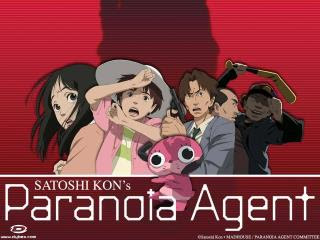
Paranoia Agent (妄想代理人 Mōsō Dairinin), a thought provoking anime

The anime's characters Paranoia Agent (or Delusion Agent, maybe) is an anime by famous anime director Satoshi Kon, unfortunately killed by cancer in 2010. His work is always more than it seems, focusing on the inner worlds of people and how they all perceive things differently.

The anime is only 13 episodes and starts with a simple case of violent assault on the street and then becomes stranger and stranger until it is not clear which is real and which is in someone's head. It critiques the repressive Japanese society and human nature in general, it goes from police procedural to slapstick comedy, from horror to psychological drama. The ending is, as they say, a mystery that doesn't stay solved for long. I quite liked the anime and I recommend it highly. It is rarer and rarer to find Japanese anime which is not derivative or simply idiotic.