Tuesday, 29 March 2016

The Magicians book trilogy, by Lev Grossman

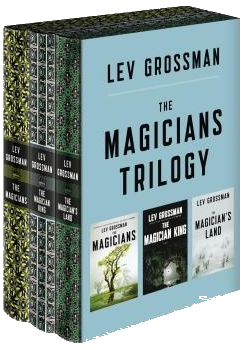
Trilogy boxed set I will be reviewing all three books in The Magicians trilogy, by Lev Grossman, as they are one complete story with a beginning and an end, as well as an overarching moral. My review of the first book only, from the perspective of someone who enjoys the (very different!!) TV show, stands.

To understand The Magicians you need to understand who Lev Grossman is: a book critic for Time magazine. As such, he must have had a very strange experience trying to write after probably demolishing a lot of other writers for their lack of skill or overuse of tropes. Therefore some sort of alarm bells must sound when he undertakes to writing a "trilogy of fantasy books", a concept that is a meta-trope in itself. I believe he attempted to break the mould of the genre by using flawed every day characters on a journey that is less heroic as closer to real life: random things happening to you, bad things which you can't avoid, defeat or change, even if you try, which sometimes you don't, because you are scared or bored or selfish. At the end of said journey you are altered, but is it a better you, or just an old damaged version of the dreamer kid you started out as?

For this belief alone, I say that the books were decent because they achieved their purpose. The topics approached are more adult, the characters different from the plethora of fantasy heroes, the elements that seem to randomly appear get resolved somewhere in the far future rather than in the confined timeframe of an "episode". I loved the concept and therefore I liked the books.

However, that doesn't mean everything is rosy in Fillory. The characters are barely built up, the reader starves for some understanding of why people do the things they do or even think or feel in a certain way. Important influences such as home, childhood, parents, siblings, good friends are being ignored and abandoned, while the action of the people in the books are more often described than explained. Satirical references to well known works in the fantasy and science fiction genres pepper the books, but those stories at least attempted some consistency, while The Magicians, especially the Fillory part, feels like an LSD trip of an autistic dork.

The worst sin the books commit, and that is in direct conflict with what I think their goal was, is to make the characters almost impossible to empathize with. All of them move through the story like pieces on a board, almost indifferent to their surroundings and the people that accompany them and mostly annoyed. Whatever deep feelings they do have come out as quirky and obsessive, rather than real. It was with great dissatisfaction that I realized that the character I most identified with and believed real was The Beast, which is a terrible villain for most of the first half of the story. People died, were hurt, tortured and violated, resurrected and I couldn't care less. Mythological monsters and weird random creations were epically battling at the end of the world, and I was just bored, waiting for something interesting to happen.

Bottom line: good idea, bad implementation. Interesting to read, but hardly something that I would recommend as good writing.

Wednesday, 23 March 2016

Chrome extension: Bookmark Explorer

Update 29 August 2017 - Version 3.0.4: The extension has been rewritten in EcmaScript6 and tested on Chrome, Firefox and Opera.

Update 03 March 2017 - Version 2.9.3: added a function to remove marketing URLs from all created bookmarks. Enable it in the Advanced settings section. Please let me know of any particular parameters you need purged. So far it removes utm_*, wkey, wemail, _hsenc, _hsmi and hsCtaTracking.

Update 26 February 2017: Version (2.9.1): added customizing the URL comparison function. People can choose what makes pages different in general or for specific URL patterns
Update 13 June 2016: Stable version (2.5.0): added Settings page, Read Later functionality, undelete bookmarks page and much more.
Update 8 May 2016: Rewritten the extension from scratch, with unit testing.
Update 28 March 2016: The entire source code of the extension is now open sourced at GitHub.

a screenshot of the extensions Whenever I read my news, I open a bookmark folder containing my favorite news sites, Twitter, Facebook, etc. I then proceed to open new tabs for each link I find interesting, closing the originating links when I am done. Usually I get a number of 30-60 open tabs. This wreaks havoc on my memory and computer responsiveness. And it's really stupid, because I only need to read them one by one. In the end I've decided to fight my laziness and create my first browser extension to help me out.

The extension is published here: Siderite's Bookmark Explorer and what it does is check if the current page is found in any bookmark folder, then allow you to go forward or backwards inside that folder.

So this is my scenario on using it:
  1. Open the sites that you want to get the links from.
  2. Open new tabs for the articles you want to read or YouTube videos you want to watch,etc.
  3. Bookmark all tabs into a folder.
  4. Close all the tabs.
  5. Navigate to the bookmark folder and open the first link.
  6. Read the link, then press the Bookmark Navigator button and then the right arrow. (now added support for context menu and keyboard shortcuts)
  7. If you went too far by mistake, press the left arrow to go back.

OK, let's talk about how I did it. In order to create your own Chrome browser extension you need to follow these steps:

1. Create the folder


Create a folder and put inside a file called manifest.json. It's possible structure is pretty complex, but let's start with what I used:
{
"manifest_version" : 2,

"name" : "Siderite's Bookmark Explorer",
"description" : "Gives you a nice Next button to go to the next bookmark in the folder",
"version" : "1.0.2",

"permissions" : [
"tabs",
"activeTab",
"bookmarks",
"contextMenus"
],
"browser_action" : {
"default_icon" : "icon.png",
"default_popup" : "popup.html"
},
"background" : {
"scripts" : ["background.js"],
"persistent" : false
},
"commands" : {
"prevBookmark" : {
"suggested_key" : {
"default" : "Ctrl+Shift+K"
},
"description" : "Navigate to previous bookmark in the folder"
},
"nextBookmark" : {
"suggested_key" : {
"default" : "Ctrl+Shift+L"
},
"description" : "Navigate to next bookmark in the folder"
}
}
}

The manifest version must be 2. You need a name, a description and a version number. Start with something small, like 0.0.1, as you will want to increase the value as you make changes. The other thing is that mandatory is the permissions object, which tells the browser what Chrome APIs you intend to use. I've set there activeTab, because I want to know what the active tab is and what is its URL, tabs, because I might want to get the tab by id and then I don't get info like URL if I didn't specify this permission, bookmarks, because I want to access the bookmarks, and contextMenus, because I want to add items in the page context menu. More on permissions here.

Now, we need to know what the extension should behave like.

If you want to click on it and get a popup that does stuff, you need to specify the browser_action object, where you specify the icon that you want to have in the Chrome extensions bar and/or the popup page that you want to open. If you don't specify this, you get a default button that does nothing on click and presents the standard context menu on right click. You may only specify the icon, though. More on browserAction here.

If you want to have an extension that reacts to background events, monitors URL changes on the current page, responds to commands, then you need a background page. Here I specify that the page is a javascript, but you can add HTML and CSS and other stuff as well. More on background here.

Obviously, the files mentioned in the manifest must be created in the same folder.

The last item in the manifest is the commands object. For each command you need to define the id, the keyboard shortcut (only the 0..9 and A..Z are usable unfortunately) and a description. In order to respond to commands you need a background page as shown above.

2. Test the extension


Next you open a Chrome tab and go to chrome://extensions, click on the 'Developer mode' checkbox if it is not checked already and you get a Load unpacked extension button. Click it and point the following dialog to your folder and test that everything works OK.

3. Publish your extension


In order to publish your extension you need to have a Chrome Web Store account. Go to Chrome Web Store Developer Dashboard and create one. You will need to pay a one time 5$ fee to open it. I know, it kind of sucks, but I paid it and was done with it.

Next, you need to Add New Item, where you will be asked for a packed extension, which is nothing but the ZIP archive of all the files in your folder.

That's it.

Let's now discuss actual implementation details.

Adding functionality to popup elements


Getting the popup page elements is easy with vanilla Javascript, because we know we are building for only one browser: Chrome! So getting elements is done via document.getElementById(id), for example, and adding functionality is done via elem.addEventListener(event,handler,false);

One can use the elements as objects directly to set values that are related to those elements. For example my prev/next button functionality takes the URL from the button itself and changes the location of the current tab to that value. Code executed when the popup opens sets the 'url' property on the button object.

Just remember to do it when the popup has finished loading (with document.addEventListener('DOMContentLoaded', function () { /*here*/ }); )

Getting the currently active tab


All the Chrome APIs are asynchronous, so the code is:
chrome.tabs.query({
'active' : true,
'lastFocusedWindow' : true
}, function (tabs) {
var tab = tabs[0];
if (!tab) return;
// do something with tab
});

More on chrome.tabs here.

Changing the URL of a tab


chrome.tabs.update(tab.id, {
url : url
});

Changing the icon in the Chrome extensions bar


if (chrome.browserAction) chrome.browserAction.setIcon({
path : {
'19' : 'anotherIcon.png'
},
tabId : tab.id
});

The icons are 19x19 PNG files. browserAction may not be available, if not declared in the manifest.

Get bookmarks


Remember you need the bookmarks permission in order for this to work.
chrome.bookmarks.getTree(function (tree) {
//do something with bookmarks
});

The tree is an array of items that have title and url or children. The first tree array item is the Bookmarks Bar, for example. More about bookmarks here.

Hooking to Chrome events


chrome.tabs.onUpdated.addListener(refresh);
chrome.tabs.onCreated.addListener(refresh);
chrome.tabs.onActivated.addListener(refresh);
chrome.tabs.onActiveChanged.addListener(refresh);
chrome.contextMenus.onClicked.addListener(function (info, tab) {
navigate(info.menuItemId, tab);
});
chrome.commands.onCommand.addListener(function (command) {
navigate(command, null);
});

In order to get extended info on the tab object received by tabs events, you need the tabs permission. For access to the contextMenus object you need the contextMenus permission.

Warning: if you install your extension from the store and you disable it so you can test your unpacked extension, you will notice that keyboard commands do not work. Seems to be a bug in Chrome. The solution is to remove your extension completely so that the other version can hook into the keyboard shortcuts.

Creating, detecting and removing menu items


To create a menu item is very simple:
chrome.contextMenus.create({
"id" : "menuItemId",
"title" : "Menu item description",
"contexts" : ["page"] //where the menuItem will be available
});
However, there is no way to 'get' a menu item and if you try to blindly remove a menu item with .remove(id) it will throw an exception. My solution was to use an object to store when I created and when I destroyed the menu items so I can safely call .remove().

To hook to the context menu events, use chrome.contextMenus.onClicked.addListener(function (info, tab) { }); where info contains the menuItemId property that is the same as the id used when creating the item.

Again, to access the context menu API, you need the contextMenus permission. More about context menus here.

Commands


You use commands basically to define keyboard shortcuts. You define them in your manifest and then you hook to the event with chrome.commands.onCommand.addListener(function (command) { });, where command is a string containing the key of the command.

Only modifiers, letters and digits can be used. Amazingly, you don't need permissions for using this API, but since commands are defined in the manifest, it would be superfluous, I guess.

That's it for what I wanted to discuss here. Any questions, bug reports, feature requests... use the comments in the post.

Tuesday, 22 March 2016

Monday, 21 March 2016

The Magicians, by Lev Grossman

Book cover I'm seeing a pattern here already. After The Expanse, which surprised me with how good the TV show was compared to the books, now The Magicians does the same. There is something to be said about hindsight and when you are adapting a series of books for the small screen you get a lot of resources that the writer himself did not have when he began. I have a feeling that many things that happened in the first season of the TV series will not even happen in the second book. The plot has been changed as well, quite a lot, to the point that now I will be reviewing a book that has at most half of it to do with what you might have seen on TV and another half that you probably won't see even in the future.

In The Magicians, the first book in the series with the same name, Lev Grossman describes a pretty dorky character suddenly finding that magic is real and he is a magician. But while it starts like the typical fantasy story, it continues quite differently, with a school of magic that doesn't seem to care about its students much, a way of learning and doing magic that is never quite explained, but described as tedious and difficult, and an overall depressing view on the world. The main character isn't even very heroic, quite the opposite, he really does think and feel like a 'dork'. If anything, he is a coward and a person who's few feelings are confused and pretty much self involved. His friends are none the better and the entire thing soon started to take a toll on me, who failed to empathize with anything and anybody.

Another issue with the book is that it is rarely consistent. Things happen without much explanation and then they turn into others. Modern culture references mix with awe of magic and then seriously fucked up shit, only to slip into irony or even slapstick comedy. It gets the reader curious about what is going to happen next, but always on the brink of "why am I reading this?". Myself I am sometimes completely engrossed in a bit of the story only to see it end abruptly and leading to nowhere. Doors to other realms are opened and nobody really cares for it for any reason other than to become kings and party all the time. People die or characters do some really shitty things, but the others are all calm and going on with their lives.

So yeah, I don't know if I should recommend the books yet. The show is levels of magnitude better so far, in story, consistency and character development. Even if I could buy into the whole borderline autistic asshole of a main character, which I was ready to, the sudden and often context switch made me really difficult for me to enjoy the series so far. However it is original and I have not read a book that sees the world quite in the same way. If you are tired of the same old fantasy stuff, The Magicians is a bit more adult and hard to put in a clear box, touching real young people topics, like sexuality, alcohol, drugs, depression, uncertainty, the search for happiness.

Friday, 18 March 2016

How to draw outlined text in WPF and then how to draw anything at all on that text

I have found a new addiction: prowling StackOverflow and answering questions. It does teach a lot, because you must provide in record time a quality answer that is also appreciated by the person asking the question and by the evil reviewers who hunt you down and downvote you if you mess up. OK, they're not evil, they're necessary. Assholes! :) Anyway, in honor of my 1000th point, I want to share with you the code that I have been working on for one of the questions.

resulting text The question had a misleading title: How to inherit a textblock properties to a custom control in c# and had a 500 points reward on it (that's a lot) placed there by another person than the original requester. In fact, the question was more about how to use a normal TextBlock control, but also have it display outlined text, with a specific "stroke" and thickness. Funny thing, I had already answered this question a few days before. The bounty, though, was set on a more formal answer, one that would cover any graphical transformation on a TextBlock, considering that the control had sealed the OnRender overload and there was no way of reaching its drawing context.

We need to consider that WPF was designed to be modular, unlike ASP.Net or Windows Forms, for which inheritance was the preferred way to go. Instead WPF favors composition. That is why controls are sealing their OnRender implementation, because there is another way of getting to the drawing context and that is an Adorner. Now, it is also possible to use an Effect, but for the life of me I couldn't understand how to easily write one.

Anyway, adorners have their pros and cons. The pro is that you get to still use a TextBlock or whatever control you want to use and you just adorn it with what you need. It receives a UIElement in the constructor and in its OnRender method you get access to the drawing context of the control. Here is the code of the adorner that I presented in the StackOverflow question:
public class StrokeAdorner : Adorner
{
private TextBlock _textBlock;

private Brush _stroke;
private ushort _strokeThickness;

public Brush Stroke
{
get
{
return _stroke;
}

set
{
_stroke = value;
_textBlock.InvalidateVisual();
InvalidateVisual();
}
}

public ushort StrokeThickness
{
get
{
return _strokeThickness;
}

set
{
_strokeThickness = value;
_textBlock.InvalidateVisual();
InvalidateVisual();
}
}

public StrokeAdorner(UIElement adornedElement) : base(adornedElement)
{
_textBlock = adornedElement as TextBlock;
ensureTextBlock();
foreach (var property in TypeDescriptor.GetProperties(_textBlock).OfType<PropertyDescriptor>())
{
var dp = DependencyPropertyDescriptor.FromProperty(property);
if (dp == null) continue;
var metadata = dp.Metadata as FrameworkPropertyMetadata;
if (metadata == null) continue;
if (!metadata.AffectsRender) continue;
dp.AddValueChanged(_textBlock, (s, e) => this.InvalidateVisual());
}
}

private void ensureTextBlock()
{
if (_textBlock == null) throw new Exception("This adorner works on TextBlocks only");
}

protected override void OnRender(DrawingContext drawingContext)
{
ensureTextBlock();
base.OnRender(drawingContext);
var formattedText = new FormattedText(
_textBlock.Text,
CultureInfo.CurrentUICulture,
_textBlock.FlowDirection,
new Typeface(_textBlock.FontFamily, _textBlock.FontStyle, _textBlock.FontWeight, _textBlock.FontStretch),
_textBlock.FontSize,
Brushes.Black // This brush does not matter since we use the geometry of the text.
);

formattedText.TextAlignment = _textBlock.TextAlignment;
formattedText.Trimming = _textBlock.TextTrimming;
formattedText.LineHeight = _textBlock.LineHeight;
formattedText.MaxTextWidth = _textBlock.ActualWidth - _textBlock.Padding.Left - _textBlock.Padding.Right;
formattedText.MaxTextHeight = _textBlock.ActualHeight - _textBlock.Padding.Top;// - _textBlock.Padding.Bottom;
while (formattedText.Extent==double.NegativeInfinity)
{
formattedText.MaxTextHeight++;
}

// Build the geometry object that represents the text.
var _textGeometry = formattedText.BuildGeometry(new Point(_textBlock.Padding.Left, _textBlock.Padding.Top));
var textPen = new Pen(Stroke, StrokeThickness);
drawingContext.DrawGeometry(Brushes.Transparent, textPen, _textGeometry);
}

}

The first con is that you need to use it in code, there is no native way of using it from XAML. The second con, and the most brutal, is that when the control changes what it renders, the adorner doesn't follow suit! Someone answered it better than I can describe it here. Guess where? On StackOverflow, of course.

The first problem I have solved with another great WPF contraption: attached properties. Here is the code for the properties:
public static class Adorning
{
public static Brush GetStroke(DependencyObject obj)
{
return (Brush)obj.GetValue(StrokeProperty);
}
public static void SetStroke(DependencyObject obj, Brush value)
{
obj.SetValue(StrokeProperty, value);
}
// Using a DependencyProperty as the backing store for Stroke. This enables animation, styling, binding, etc...
public static readonly DependencyProperty StrokeProperty =
DependencyProperty.RegisterAttached("Stroke", typeof(Brush), typeof(Adorning), new PropertyMetadata(Brushes.Transparent, strokeChanged));

private static void strokeChanged(DependencyObject d, DependencyPropertyChangedEventArgs e)
{
var stroke= e.NewValue as Brush;
ensureAdorner(d,a=>a.Stroke=stroke);
}

private static void ensureAdorner(DependencyObject d, Action<StrokeAdorner> action)
{
var tb = d as TextBlock;
if (tb == null) throw new Exception("StrokeAdorner only works on TextBlocks");
EventHandler f = null;
f = new EventHandler((o, e) =>
{
var adornerLayer = AdornerLayer.GetAdornerLayer(tb);
if (adornerLayer == null) throw new Exception("AdornerLayer should not be empty");
var adorners = adornerLayer.GetAdorners(tb);
var adorner = adorners == null ? null : adorners.OfType<StrokeAdorner>().FirstOrDefault();
if (adorner == null)
{
adorner = new StrokeAdorner(tb);
adornerLayer.Add(adorner);
}
tb.LayoutUpdated -= f;
action(adorner);
});
tb.LayoutUpdated += f;
}

public static double GetStrokeThickness(DependencyObject obj)
{
return (double)obj.GetValue(StrokeThicknessProperty);
}
public static void SetStrokeThickness(DependencyObject obj, double value)
{
obj.SetValue(StrokeThicknessProperty, value);
}
// Using a DependencyProperty as the backing store for StrokeThickness. This enables animation, styling, binding, etc...
public static readonly DependencyProperty StrokeThicknessProperty =
DependencyProperty.RegisterAttached("StrokeThickness", typeof(double), typeof(Adorning), new PropertyMetadata(0.0, strokeThicknessChanged));

private static void strokeThicknessChanged(DependencyObject d, DependencyPropertyChangedEventArgs e)
{
ensureAdorner(d, a =>
{
if (DependencyProperty.UnsetValue.Equals(e.NewValue)) return;
a.StrokeThickness = (ushort)(double)e.NewValue;
});
}
}
and an example of use:
<TextBlock
x:Name="t1"
HorizontalAlignment="Stretch"
FontSize="40"
FontWeight="Bold"
local:Adorning.Stroke="Red"
local:Adorning.StrokeThickness="2"
Text="Some text that needs to be outlined"
TextAlignment="Center"
TextWrapping="Wrap"

Width="600">
<TextBlock.Foreground>
<LinearGradientBrush StartPoint="0,0" EndPoint="1,1">
<GradientStop Offset="0" Color="Green" />
<GradientStop Offset="1" Color="Blue" />
</LinearGradientBrush>
</TextBlock.Foreground>
</TextBlock>

Now for the second problem, the StrokeAdorner already has a fix in the code, but I need to be more specific about it, because as it is written now I believe it leaks memory. Nothing terribly serious, but still. The code I am talking about is in the constructor:
foreach (var property in TypeDescriptor.GetProperties(_textBlock).OfType<PropertyDescriptor>())
{
var dp = DependencyPropertyDescriptor.FromProperty(property);
if (dp == null) continue;
var metadata = dp.Metadata as FrameworkPropertyMetadata;
if (metadata == null) continue;
if (!metadata.AffectsRender) continue;
dp.AddValueChanged(_textBlock, (s, e) => this.InvalidateVisual());
}
Here I am enumerating each property of the target (the TextBlock) and checking if they are dependency properties and if they have in their metadata the AffectsRender flag, they I add a property change handler which calls InvalidateVisual on the adorner. Notice that in no part of the code do I remove those handlers. However, at this time I don't think it is a problem. Anyway, the code itself is more about the principles of the thing, rather than the implementation.

If I were to talk about the implementation, I would say that this code doesn't always work. Even if I use the padding of the element and its actual dimensions, the FormattedText sometimes renders things differently from the TextBlock, especially if one plays with TextWrap and TextTrimming. But that is another subject altogether. Yay! 1000 points on StackOverflow! "And what do you do with the points?" [my wife :(]

Monday, 14 March 2016

Creating a C# construct that acts like a more complex switch/case

Inspired by my own post about simulating F# active patterns in C# and remembering an old crazy post about using try/catch to emulate a switch on types, I came up with this utility class that acts and looks like a switch statement, but can do a lot more. The basic idea was to use a fluent interface to get the same functionality of switch, but also add the possibility of using complex objects as case values or even code conditions.
an example of use

First, here is the source code:
namespace Constructs
{
public static class Do
{
public static Switch<T> Switch<T>(T value)
{
return Constructs.Switch<T>.From(value);
}
}

public class Switch<T>
{
private bool _isDone;
private T _value;
private Type _valueType;

private Switch(T value)
{
this._value = value;
}

public static Switch<T> From(T value)
{
return new Switch<T>(value);
}

public Switch<T> Case(Func<T> valueFunc, Action<T> action, bool fallThrough = false)
{
if (_isDone) return this;
return Case(valueFunc(), action, fallThrough);
}

public Switch<T> Case(T value, Action<T> action, bool fallThrough = false)
{
if (_isDone) return this;
return If(v => object.Equals(value, v), action, fallThrough);
}

public void Default(Action<T> action)
{
if (_isDone) return;
action(_value);
}

public Switch<T> If(Func<T, bool> boolFunc, Action<T> action, bool fallThrough = false)
{
if (_isDone) return this;

if (boolFunc(_value))
{
action(_value);
_isDone = !fallThrough;
}

return this;
}

private Type getValueType()
{
if (_valueType != null) return _valueType;
if (object.Equals(_value, null)) return null;
_valueType = _value.GetType();
return _valueType;
}

public Switch<T> OfStrictType<TType>(Action<T> action, bool fallThrough = false)
{
if (_isDone) return this;
if (getValueType() == typeof(TType))
{
action(_value);
_isDone = !fallThrough;
}
return this;
}

public Switch<T> OfType<TType>(Action<T> action, bool fallThrough = false)
{
if (_isDone) return this;
if (getValueType() == null) return this;
if (typeof(TType).IsAssignableFrom(getValueType()))
{
action(_value);
_isDone = !fallThrough;
}
return this;
}
}
}
I use the static class Do to very easily get a Switch<T> object based on a value, then run actions on that value. The Switch class has a _value field and an _isDone field. When _isDone is set to true, no action is further executed (like breaking from a switch block). The class has the methods Case, and If, as well as OfType and OfStrictType, all of which execute an action if either the value, the function, the condition or the type provided match the initial value. Default is always last, executing an action and setting _isDone to true;

Here is an example of use:
for (var i = 0; i < 25; i++)
{
Do.Switch(i)
.Case(10, v => Console.WriteLine("i is ten"), true)
.Case(() => DateTime.Now.Minute / 2, v =>
Console.WriteLine($"i is the same with half of the minute of the time ({v})"), true)
.If(v => v % 7 == 0, v => Console.WriteLine($"{v} divisible by 7"))
.Default(v => Console.WriteLine($"{v}"));
}
where the numbers from 0 to 25 are compared with 10, the half of the minutes value of the current time and checked if they are divisible by 7, else they are simply displayed. Note that the first two Case methods receive an optional bool parameter that allows the check to fall through, so that the value is checked if it is equal to 10, but also if it is twice the minute value or divisible by 7. On the other hand, if the value is divisible by 7 it will not display the value in the Default method.

Here is an example that solves the type check with the same construct:
var f = new Action<object>(x =>
Do.Switch(x)
.OfType<string>(v => Console.WriteLine($"{v} is a string"))
.OfType<DateTime>(v => Console.WriteLine($"{v} is a DateTime"))
.OfType<int>(v => Console.WriteLine($"{v} is an integer"))
.OfType<object>(v => Console.WriteLine($"{v} is an object"))
);
f(DateTime.Now);
f("Hello, world!");
f(13);
f(0.45);

And finally, here is the solution to the famous FizzBuzz test, using this construct:
for (var i = 0; i < 100; i++)
{
Do.Switch(i)
.If(v => v % 15 == 0, v => Console.WriteLine($"FizzBuzz"))
.If(v => v % 3 == 0, v => Console.WriteLine($"Fizz"))
.If(v => v % 5 == 0, v => Console.WriteLine($"Buzz"))
.Default(v => Console.WriteLine($"{v}"));
}

Now, the question is how does this fare against the traditional switch? How much overhead does it add if we would, let's say, take all switch/case blocks and replace them with this construct? This brings me to the idea of using AOP to check if the construct is of a certain shape and then replace it with the most efficient implementation of it. With the new Roslyn compiler I think it is doable, but beyond the scope of this post.

I have tried, in the few minutes that it took to write the classes, to think of performance. That is why I cache the value type, although I don't think it really matters that much. Also note there is a difference between Case(v=>SomeMethodThatReturnsAValue(),DoSomething()) and Case(SomeMethodThatReturnsAValue(),DoSomething()); In the first case, SomeMethodThatReturnsAValue will only be executed if the switch has not matched something previously, while in the second, the method will be executed to get a value and then, when the time comes, the switch will compare it with the initial value. The first method is better, with only 4 extra characters.

Hope it helps someone.

Nemesis Games (The Expanse book 5), by James S.A. Corey

book cover Nemesis Games felt like a fixer-upper. The authors had already established a pattern in the books from The Expanse, mainly a psychopathic villain and the motley crew of the Rocinante saving the world through bouts of coincidence and luck that are impossible to believe, and so seeing the exact same formula used again in the fifth book was a disappointment. However, they had another issue: the characters of the story were not very clearly defined. Having hinted since forever that each of the people on the ship had a heavy past, James S.A. Corey decided to explain almost all of those pasts in this book. The fact that the disaster was epic made the book easy to read through, in that "what happens next" trance, but it felt the book version of an elevator show. It even ended badly, with conflicts unresolved and a cliffhanger "to be continued" scene at the end. The sixth book of the series, Babylon's Ashes, is supposed to be published in April this year and seriously I am asking myself if I want to continue reading it.

To be honest, the book was not bad. It was just so recklessly slapped together using book writing rules that it felt like a commercial TV show. And I don't mean one of the good ones like, ironically, the first season of The Expanse, I mean those long winded cop shows that lead to nothing. I wasn't the only one to notice that the characters in the series have not really evolved one bit since they were introduced, despite having passed through five separate world saving scenarios. Taking a page from their mentor, George R.R. Martin, the authors just let the alien presence linger in the shadows, having no role whatsoever besides the one of stage prop. Meanwhile, all the conflict, all the struggle is between ordinary humans. This appeals, but then it bores. And yes, I have to admit to myself, the feeling I am left with after reading Nemesis Games is boredom.

Perhaps if at least one of the books would have explained the actions and motivations and background of the villains, other than being sick in the head, I would have liked the series more. I know that there are short novellas that try to do that and I did try to read some, but after a few tens of pages I gave up. If the books feel like an endlessly rehashed formula, the novellas feel like those quotes from fictional people and books that some sci-fi writers adorn their chapters with. If I make efforts to feel anything for the people in the books, I feel absolutely nothing for the sketched out secondary characters in the novellas.

So there, after reading the five books one after the other like there was no tomorrow, my final verdict is 'meh'. Perhaps they should have hired Brandon Sanderson to finish up the series. That guy is good at that. Hey, Brandon, can you write three books in The Expanse, starting from the second book, Caliban's War, and ignoring the rest?
